
Add an image
Drop a PNG or JPG tile image
Seamless texture generator for pixel art tiles
Make any texture repeat without a seam
Upload a square image and this tool wraps its edges so it repeats forever with no visible join.
A seam is what you get when the right edge of a tile does not match the left edge it lands next to. Repeat that tile across a map and the mismatch becomes a hard grid line running through your level. The blend here fixes the edges rather than the middle, so the texture keeps its detail.
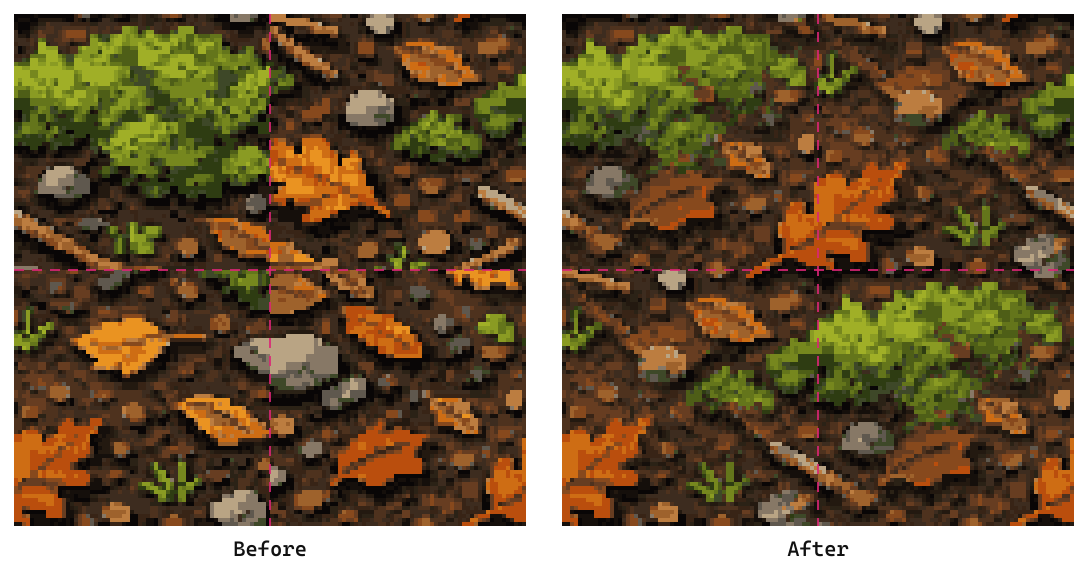
That's a 128x128 square cropped straight out of a larger forest floor image, tiled 2x2 and zoomed on the junction. The moss stops dead at the crop line on the left. On the right it grows through.
What the seamless strength slider does
Strength controls how far the blend reaches in from each edge, and 100% is not always the right answer.
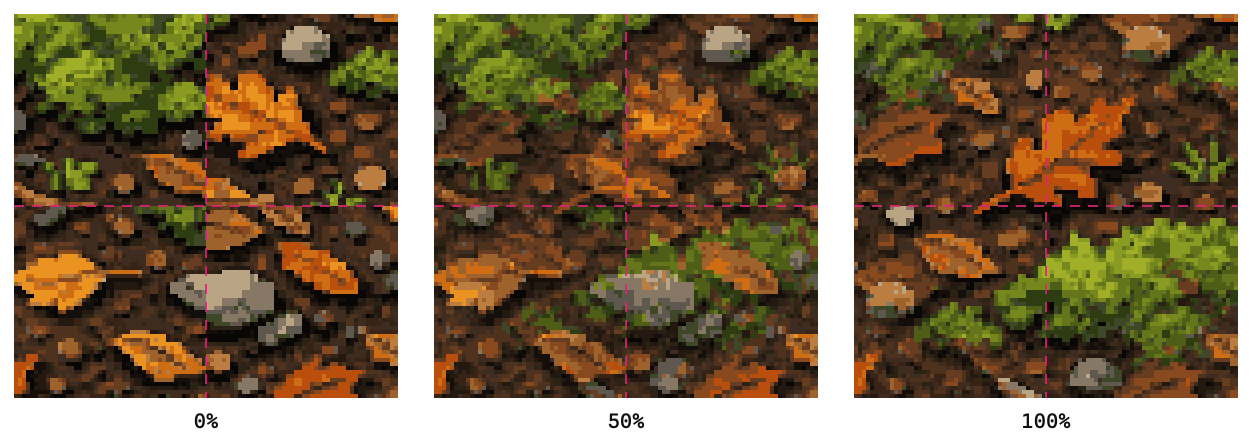
At 0% nothing changes and you're looking at your original. At 50% the join softens but a faint line can survive. At 100% you get the full GEGL blend, the same algorithm GIMP uses.
Push it to 100% for organic textures like grass, dirt, moss and water, where nobody can tell where one clump ends. Back it off toward 60-75% for structured textures like brick and cobblestone, because a strong blend smears the mortar lines into mush. If you see a diamond-shaped smudge in the center of the tile, that's the blend overlapping itself. Lower the strength.
Check every edge with the offset sliders
The offset sliders move the seam into the middle of the preview, which is the only reliable way to see it.
A seam sits at the tile boundary, and boundaries fall at the edge of the preview where they're easy to miss. Drag Offset X and Offset Y to half your tile size, 64 on a 128 tile, and the four outer corners meet dead center. Anything wrong shows up immediately. Slide through the full range to walk the join across the whole texture.
The grid slider repeats your tile from 2x2 up to 6x6. Small grids show detail, large grids expose repetition, which is the other failure mode. A tile can be perfectly seamless and still look bad because one bright rock repeats forty times across the floor.
Which textures tile well
Organic textures tile easily, structured ones need care, and directional ones need hand work.
Grass, dirt, sand, gravel, lava, water and moss all blend cleanly, because your eye has no straight line to check the blend against. Stone, cobblestone and brick work at lower strength, since the mortar grid is exactly the straight line that gives a smeared blend away. Roads, rivers, fences and anything with a direction will not survive an automatic blend, because the feature has to line up end to end. That's a drawing job, and the pixel editor works as a tile editor for exactly that kind of touch-up.
Your palette is safe either way. The blend produces in-between colors, then every pixel snaps back to the nearest color that was already in your image, so a 16-color tile comes out with the same 16 colors.
Tile sizes
Pick 32x32, 64x64 or 128x128, and let the texture's biggest feature decide.
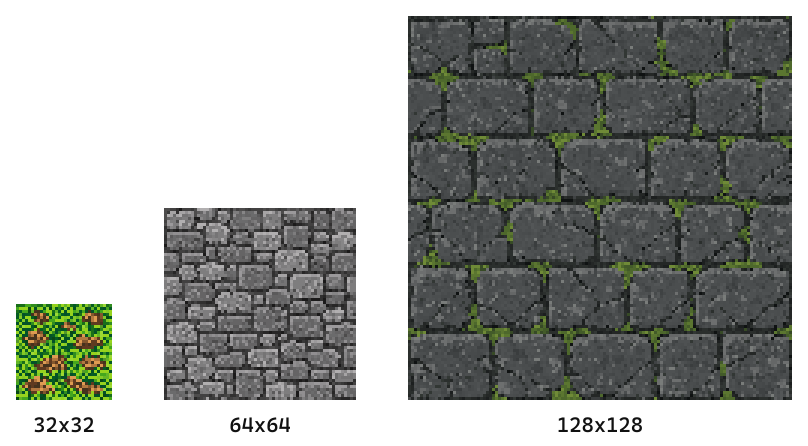
32x32 is the practical floor. It holds a texture, not a pattern, so it suits grass and dirt where the detail is noise. 64x64 is the workhorse for ground and walls. 128x128 is where you go when a single feature is large, like the full stone blocks above, and it's the size that survives being seen up close.
The tool accepts any square, so bigger works too. Larger tiles just cost more memory in an engine and repeat less often, which is usually the point.
Seamless texture, seamless pattern, or tileset
These three get searched interchangeably and mean different things, so here's the split.
A seamless texture is one image that repeats in every direction with no visible join. That's what this tool makes, and you'll see the same thing called a seamless tile generator, a tile generator, a tile maker or an image tiler. Same job, different word. A seamless pattern usually means the same thing in design and textile work, where the repeat is decorative rather than a game surface. A tileset is a whole collection of tiles built to sit next to each other, including the corner and edge pieces that let grass meet stone cleanly, and that's a bigger job than making one square repeat.
If you need the third one, start with the tiles. Sprite AI (sprite-ai.art) doubles as an AI tile generator, since tile is one of its native asset types, so you can prompt for grass or cobblestone at 32x32 up to 512x512 through the AI sprite generator and make each result seamless here. What nobody has yet is a true one-click AI tileset generator, because the corner and edge transitions are the hard part and they need deciding, not guessing. The seamless tiles guide walks through assembling one.
How it works
Five steps, and nothing leaves your browser.
- Upload any square image, PNG, JPG or WebP
- Watch the tiled preview to see where the seams fall
- Set the seamless strength, starting at 100% and backing off if the texture is structured
- Slide Offset X and Offset Y to half your tile size to inspect the join
- Download the processed tile as a PNG
No account, no server upload, no watermark.
More free pixel art tools
 Tool
ToolPixel art editor
Create and edit pixel art sprites in your browser. Custom canvas sizes, paint tools, export as PNG or SVG.
 Tool
ToolSprite sheet pivot editor
Preview a sprite sheet frame by frame and set the pivot point, frame rate, and loop. Export a ready-to-use manifest.
 Tool
ToolNoise generator
Generate pixel noise patterns and textures — Perlin, checkers, bricks, random.
FAQ
Organic textures like grass, dirt, sand, lava, stone, and water work great. Structured tiles like brick and cobblestone work well at lower strength settings. Directional tiles such as roads and rivers usually need manual editing afterwards.
No. The processing snaps every pixel to the nearest color in your original palette. If your tile has 16 colors, the output has the exact same 16 colors.
Yes. Upload any tile image, it doesn't need to be generated with Sprite AI. The seamless processing works on any pixel art tile.
It controls how much edge blending is applied. 0% means no change and 100% is a full GEGL seamless blend. For most textures 75-100% works well. Lower it if you see diamond-shaped artifacts in the middle of the tile.
Yes, and that is the most common use. Crop a square out of any image, upload it, and the blend wraps its edges so the square repeats without a visible join.
32x32 is the practical floor for detail, 64x64 suits most ground and wall textures, and 128x128 is where you go when the texture carries large features like full stone blocks.
Yes. It runs in your browser with no account and no watermark, and the processed tile downloads as a PNG.
Yes. Crop a square out of the image, upload the square, and the edges get wrapped so it becomes a tileable image. Starting from a photo or a painted texture rather than a purpose-made tile is the most common way people use a tile image generator.
Not quite. This tool makes an image you already have repeat seamlessly, it does not draw one from a prompt. The AI sprite generator does that part, creating tiles from text at 32x32 up to 512x512, and the result can be made seamless here.