
Open the editor
Start a fresh canvas, drop in a PNG, or pick a sprite from your gallery.
Online pixel art editor and sprite editor
A pixel editor that runs in a browser tab. Draw pixel art frame by frame, flip on onion skin to line up the next pose, and scrub the timeline until the walk cycle reads. Nothing to install, no account.
The two bars, and what's in them
Tools live on the left, color and canvas settings on the right, and the artwork sits between them.
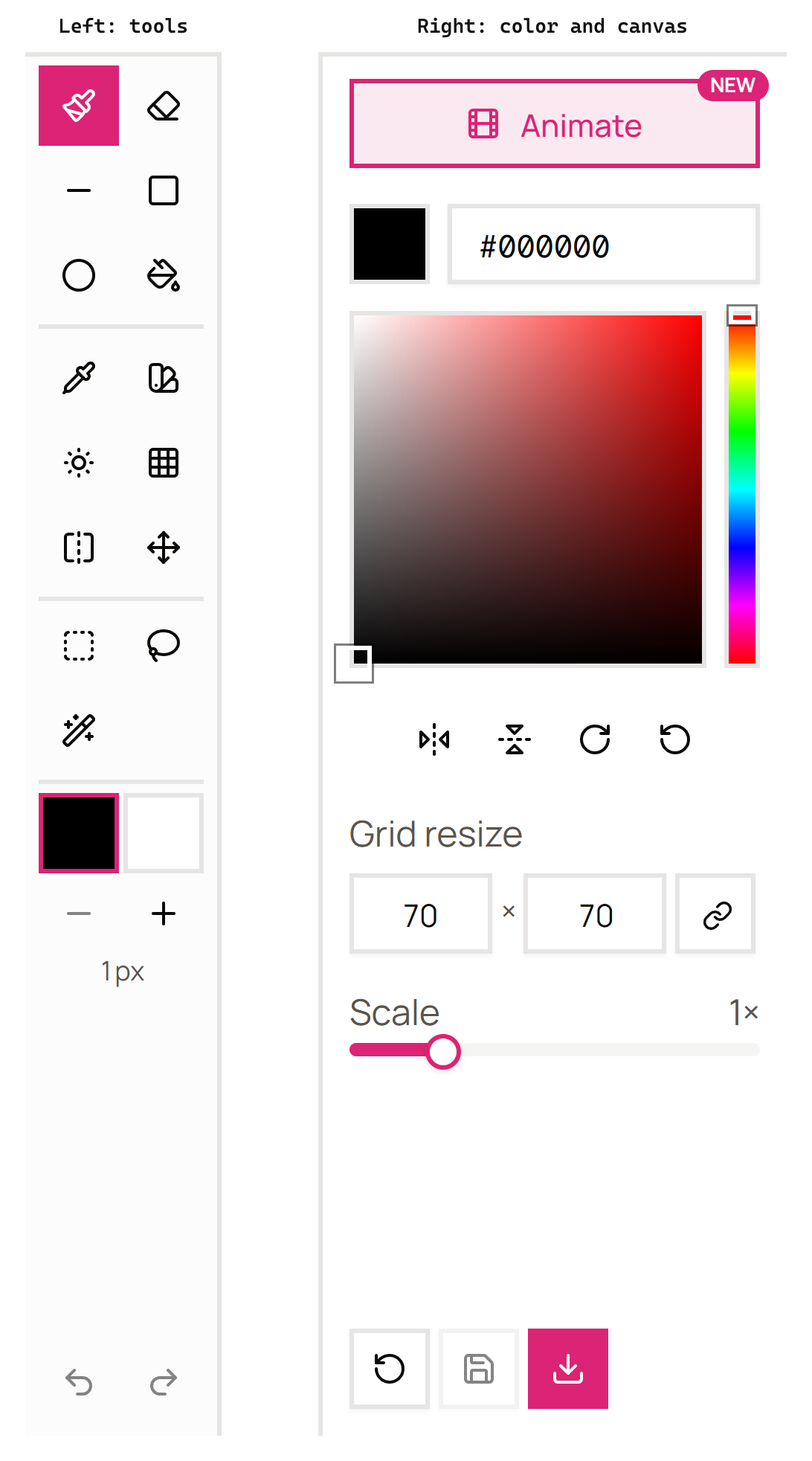
The left rail holds fifteen tools in three groups, drawing then color then selection, split by dividers. Under them sit your two color swatches, the active one outlined in pink, and a stepper for brush size. Undo and redo are pinned to the bottom of the rail.
The right panel starts with Animate, which opens the frame timeline. Below it is the current color as a hex field you can type straight into, the color field with its hue strip, and four one-click transforms: flip horizontal, flip vertical, rotate right, rotate left. Then grid resize, where the link button keeps width and height locked together, and a scale slider that zooms the canvas without touching the sprite. Reset, save and download sit at the very bottom.
What every tool does
Every tool has a single-key shortcut, so you never have to go back to the rail.
| Tool | Key | What it does |
|---|---|---|
 Pen Pen | P | Draws pixels at the current brush size |
 Eraser Eraser | E | Clears pixels back to transparent |
 Line Line | B | Drag from one point to another for a straight line |
 Rectangle Rectangle | R | Drag out a box |
 Circle Circle | C | Drag out an ellipse |
 Fill Fill | G | Flood-fills a connected area of one color |
 Color picker Color picker | I | Samples a color off the canvas and makes it current |
 Color swap Color swap | A | Replaces every pixel of one color with another |
 Lighten Lighten | L | Brightens as you paint. Hold Ctrl to darken instead |
 Dither Dither | D | Lays a checker pattern for gradients that stay in palette |
 Mirror pen Mirror pen | V | Draws both halves at once, mirrored across the center |
 Move Move | M | Slides the whole frame around the canvas |
 Rectangle select Rectangle select | S | Selects a box-shaped region |
 Lasso select Lasso select | F | Selects a freehand region |
 Magic wand Magic wand | W | Selects everything connected in the same color |
Three are worth knowing about early. Mirror pen halves the work on anything symmetrical. Dither is how you fake a gradient without adding colors. Lighten shades quickly, because you never stop to pick a new swatch.
Animating, frame by frame
Press Animate and a timeline opens under the canvas. That timeline is what makes this a sprite editor rather than a drawing app.
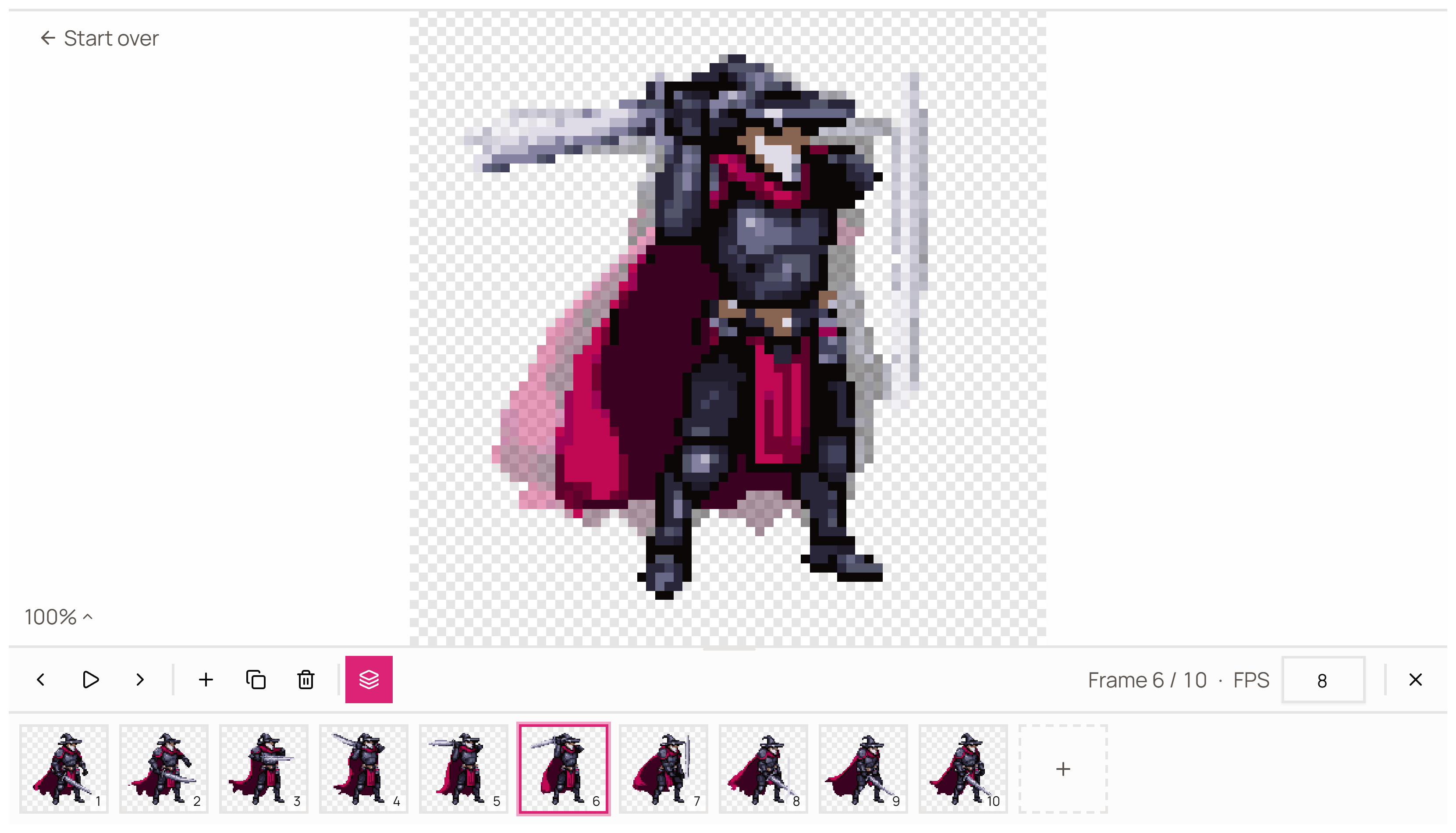
Add a frame, duplicate the one you're on, or delete it. Then turn on onion skin, the stacked-layers button, and the neighboring frame sits faintly behind your canvas so you can line the next pose up against the last one. Above, the ghost shows where the sword and cape were on the previous frame, which is exactly the information you need to place them on this one.
The strip along the bottom is every frame in order, with the one you're editing outlined in pink. The readout tells you where you are and what frame rate you're playing at.
Hit play to watch it at the frame rate you set, spot the leg that pops a pixel too far, fix it, play again. Four frames is usually enough for an idle. Walk cycles want eight. You'll know it's right when it stops looking like it's sliding.
Drop an animated GIF onto the canvas and every frame lands on the timeline at once, which is the fastest way to fix one bad frame in a cycle somebody else exported.
Sizes and export
Canvas runs from 1x1 to 512x512, and 32 or 64 covers most sprites.
Export PNG for anything you're dropping into Godot, Unity, GameMaker or a web build. Export SVG when the art needs to scale cleanly, which is handy for icons and UI. Undo and redo carry full history, so experimenting costs you nothing.
What it doesn't do
There are no layers, and that's worth knowing before you start.
You get frames instead. For sprite work at 32 or 64 pixels that trade is usually fine, because at that scale you're placing individual pixels rather than compositing passes. But it's a real limitation, and if layers are load-bearing in how you work then this isn't your editor. Our editor comparison is honest about which ones have them.
Unity's Sprite Editor is a different thing
The names collide, so it's worth clearing up.
Unity ships a window called Sprite Editor. It slices an already-imported sheet into regions and sets pivot points, and it draws nothing at all. This tool is where the art gets made. Export a PNG here, import it there.
Or skip the drawing
If you'd rather the sprite existed before you start editing, the AI sprite generator at Sprite AI (sprite-ai.art) makes one from a text description at 32x32 up to 512x512, and it opens straight into this editor for touch-ups.
More free pixel art tools
 Tool
ToolSprite sheet pivot editor
Preview a sprite sheet frame by frame and set the pivot point, frame rate, and loop. Export a ready-to-use manifest.
 Tool
ToolNoise generator
Generate pixel noise patterns and textures — Perlin, checkers, bricks, random.
 Tool
ToolPixel font generator
Type text and render it in pixel font styles. Multiple sizes, colors, and scales.
FAQ
Yes, completely free with no account required. Create, edit, and export as many sprites as you want.
Yes. It runs in the browser on desktop and mobile, there is nothing to download, and your work stays on your machine.
Yes. Add frames along the timeline, turn on onion skin to see the previous frame ghosted under the one you're drawing, and play the sequence back at whatever speed you want. That's the part that makes it a sprite editor and not just a drawing canvas.
Yes. Upload any PNG, JPG or WebP between 32 and 512 pixels on each side. Drop in an animated GIF and every frame lands on the timeline ready to edit.
No. You get frames, not layers. For most sprite work at 32 or 64 pixels that turns out to be fine, because at that size you're pushing individual pixels rather than compositing passes.
Any size from 1x1 up to 512x512 pixels. Use the presets or type your own dimensions.
No, and it's a common mix-up. Unity's Sprite Editor is a built-in window for slicing an imported sheet into regions and setting pivots. It doesn't draw anything. This is where you make the art in the first place, then export a PNG and import that into Unity.
PNG for anything going into a game engine, and SVG when you need the art to scale without turning to mush.