
Add an image
PNG, JPG, WebP, GIF (max 512×512)
Pixel art upscaler and scaler, no blur
Enlarge a sprite without the mush. This pixel art upscaler scales 2x, 4x, 8x or 16x using nearest-neighbor, so every pixel stays a hard square instead of dissolving into its neighbors.
What blurring actually is
Every general image editor guesses at the pixels between your pixels, and that guess is the blur.
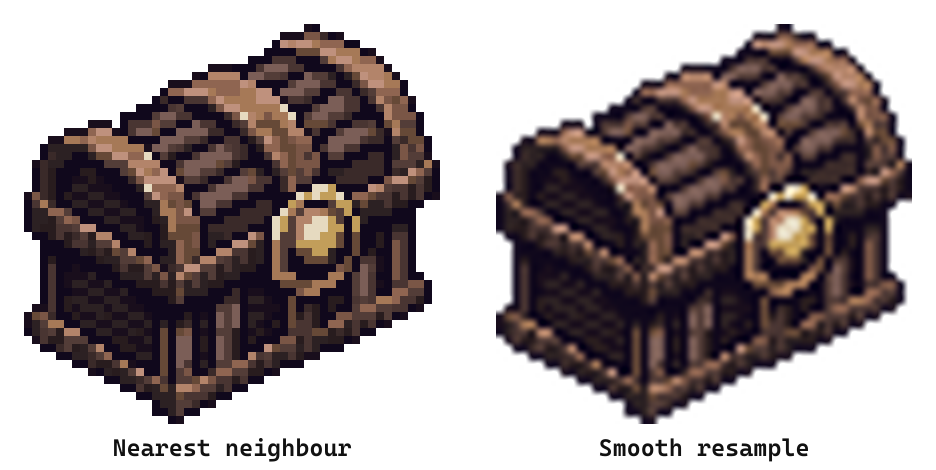
Same 52x50 chest, same 8x enlargement, two different methods. Bilinear and bicubic interpolation average each new pixel against the ones around it, which is right for photographs and wrong for art where the hard edge is the drawing.
Nearest-neighbor does no averaging. It repeats each source pixel into an exact block, so the sprite gets bigger and nothing else changes.
Look at an edge
Zoom in and the difference stops being subtle.
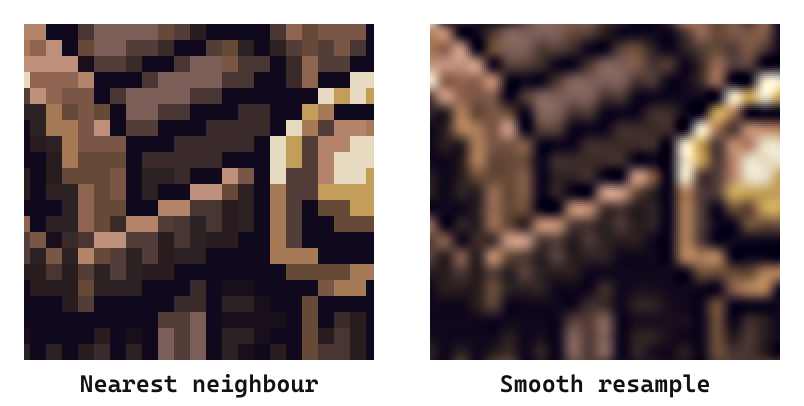
On the left, every pixel the artist placed is still a square you could count. On the right the lock has become a gradient, the outline has a halo, and the palette now holds hundreds of colors that were never in the original.
That last part matters beyond looks. A blurred sprite no longer has a limited palette, so it won't index cleanly, won't key transparency reliably, and won't match the rest of your set.
Scale factors, and which to pick
Use a whole-number factor, always.
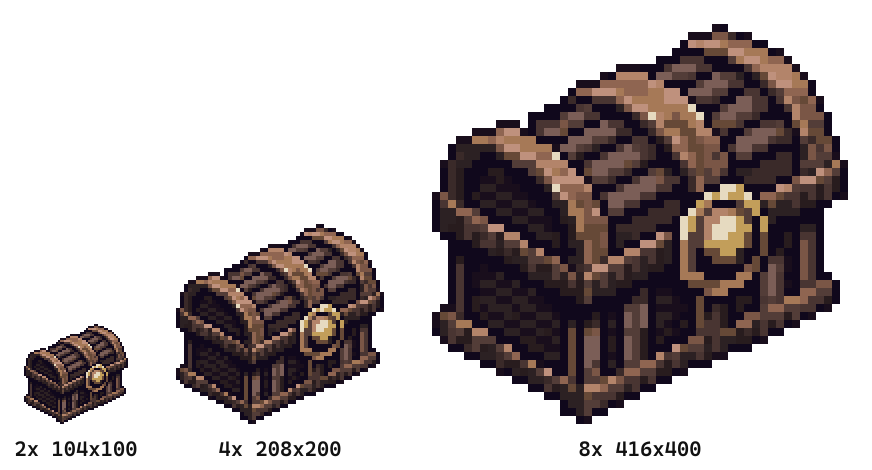
A whole number maps one source pixel onto an exact block. Scale by 3.5x and some pixels get four output pixels while their neighbors get three, which puts a visible stagger through straight lines even with nearest-neighbor doing the work.
2x to 4x is the game-engine and screenshot range. 8x to 16x is for social media, thumbnails and print, where you want the pixels themselves to be the aesthetic. The tool offers 2x, 4x, 8x and 16x, and stops there because past that you're better off exporting once and scaling in the destination.
High res pixel art is a scaling job, not a redrawing one. A 32x32 sprite at 16x is a 512x512 file that still holds exactly 32 by 32 decisions, which is the point. Nothing added detail, so the art survives being large. Asking software to invent detail at higher resolution gives you something smoother and worse.
Upscaling is not resizing
This tool only makes sprites bigger. Making them smaller is a different problem.
Enlarging repeats pixels, which is lossless and reversible. Shrinking has to discard them, and once four pixels become one there's no rule that keeps the art readable, so it needs its own handling. The pixel art resizer covers going down, or to an exact width and height that isn't a clean multiple.
How it works
Three steps, and nothing leaves your browser.
- Upload a pixel art image, PNG, JPG, WebP or GIF, up to 512x512
- Pick 2x, 4x, 8x or 16x
- Download the enlarged PNG
No account, no watermark, no upload to a server.
After the upscale
An upscaled sprite is usually on its way somewhere else.
Send it to the pixel editor if it needs touching up, the background remover if it's going on a store page, or the sprite sheet maker if it's one frame of several. If you don't have the sprite yet, the AI sprite generator at Sprite AI (sprite-ai.art) makes one from a text description at 32x32 up to 512x512.
More free pixel art tools
 Tool
ToolSprite sheet maker
Drop in several images and pack them into one sprite sheet. Set columns, padding, and scale, then export a PNG or a JSON atlas.
 Tool
ToolSprite sheet cutter
Cut a sprite sheet into separate frames. The grid is detected for you, then every frame downloads as its own PNG in a ZIP.
 Tool
ToolGIF to sprite sheet
Convert any animated GIF into a sprite sheet PNG. Tune columns, padding, and scale. Phaser-ready atlas option.
FAQ
Most image editors default to bilinear or bicubic interpolation, which invents in-between colors along every edge. This tool uses nearest-neighbor scaling, so every pixel stays a hard square.
2x to 4x suits game engines and store screenshots. 8x to 16x suits social media and print, where you want the individual pixels to read from across the room.
Yes. It runs in your browser with no account and no watermark, and the upscaled sprite downloads as a PNG.
Scale by a whole number and use nearest-neighbor. A 2x, 4x or 8x jump maps one source pixel onto an exact block of output pixels, so nothing is invented and nothing is averaged away.
Technically yes, but a photo will come out blocky. This tool is built for art where hard pixel edges are the point.
Use the pixel art resizer for that. Downscaling needs different handling, because shrinking has to throw pixels away rather than repeat them.
Any pixel art image up to 512x512, as PNG, JPG, WebP or GIF.
Yes. Sprites are pixel art, so the same nearest-neighbor pass applies to a single character, an item or a whole sheet. Pixel upscaler, sprite upscaler and pixel art scaler all describe this same job.