
Add an image
Drop a sprite sheet PNG or WebP here (max 25MB)
Sprite sheet to GIF converter
Convert sprite sheet to GIF in your browser, free and without an account. Drop a PNG or WebP in, the grid is detected for you, set the FPS, and download. Nothing uploads to a server, and both animations on this page came out of the tool above.
How it works
The grid is read for you. That is the part most converters make you do by hand.
- Drop in a sprite sheet PNG or WebP
- The converter finds the columns and rows by looking for the transparent gutters between frames, and shows you the frame count it found
- Correct the grid with the sliders if the sheet has no gutters, or set padding up to 16px
- Set the FPS and watch the preview play
- Download the animated GIF
Columns and rows go up to 32 each, so a 1,024 frame sheet is within range.
From sheet to GIF
To turn a sprite sheet into a GIF, the converter needs to know where one frame ends and the next begins, and that is the only thing it asks of the file. Here is a twelve frame walk cycle in a single row, read as 12 by 1 without being told.

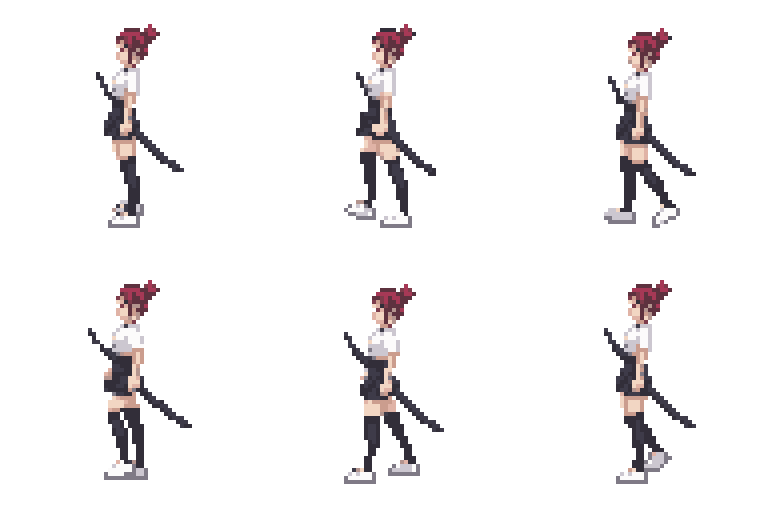
Sheets are read left to right, top to bottom, which is the order every engine writes them in.
Sheets with a partial last row
A grid rarely divides evenly. A 3x3 sheet holding 8 frames leaves one empty cell in the corner, and a converter that counts cells instead of frames turns that into a blank flash at the end of every loop.
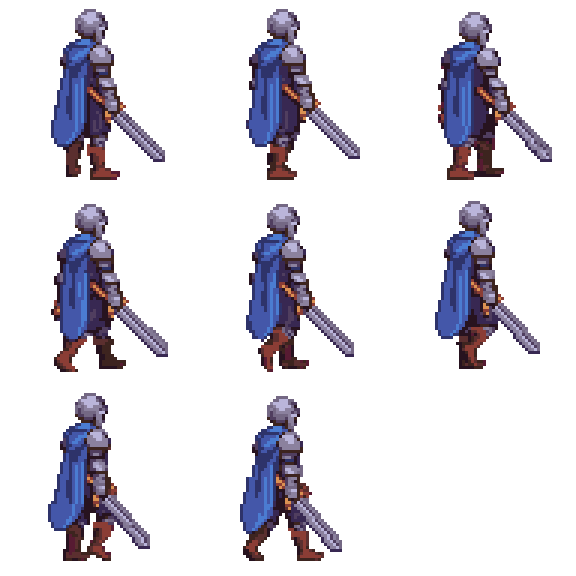
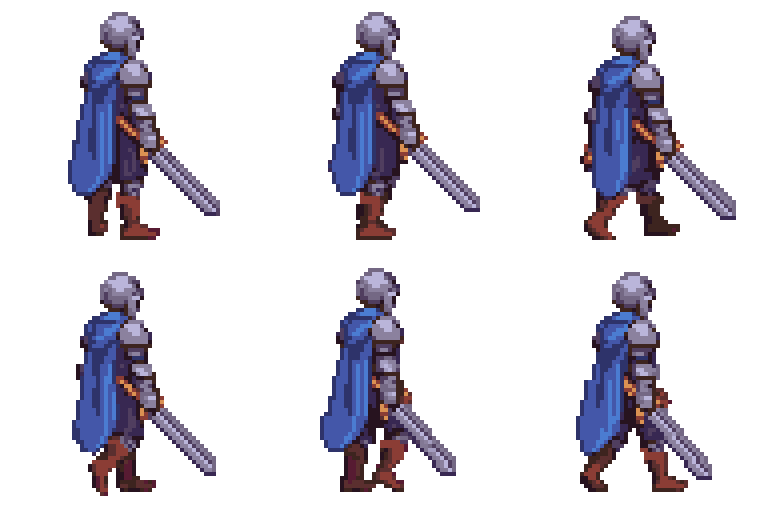
That sheet exports as 8 frames, not 9. Empty cells at the end are dropped. Empty cells in the middle are kept, because a blank frame inside an animation is usually a deliberate blink or flash, and removing it would change the timing.
Transparent backgrounds stay transparent
Transparent pixels in the sheet stay transparent in the GIF, but the format sets a hard limit worth understanding before you export.
GIF supports 1-bit alpha. A pixel is either fully visible or fully invisible, with nothing in between. Pixel art is usually fine because its edges are already hard. What suffers is anything soft, so a feathered glow, a semi-transparent shadow or an anti-aliased outline will harden into a jagged edge rather than fading out.
Two things help. Flatten soft shadows onto the background colour before exporting if the GIF will sit on a known background. Or keep the sprite's edges aliased in the first place, which is what the pixel art converter does when it quantizes an image.
Sheets that are not a uniform grid
This converter needs a uniform grid, every frame the same size in evenly spaced cells. That covers almost every sheet a game engine or an animation tool exports.
Packed atlases are the exception. A TexturePacker or Starling atlas stores frames at different sizes in whatever arrangement fits, with the rectangles listed in a separate .json or .xml file. That data is not read here. If your frames vary in size, the sprite sheet maker reads JSON atlas files and can repack the frames into an even grid, which this tool then converts.
This is the usual snag with a Friday Night Funkin' character sheet. FNF assets ship as a Sparrow XML atlas, so the frames are packed tightly at varying sizes and the XML holds the coordinates. Repack it to a grid first, then convert.
Sprites from Scratch work the same way. A .sprite3 file is a container rather than an image, so export the costumes as PNG first, arrange them into a grid, and convert that.
Picking an FPS
| Animation | FPS | Why |
|---|---|---|
| Idle, breathing, ambient loops | 6 to 8 | Slow enough to read as a hold rather than motion |
| Walk and run cycles | 8 to 12 | The standard range for pixel art locomotion |
| Attacks, dashes, impacts | 16 to 24 | Fast actions need the frames to land quickly |
| Re-exporting a GIF you split earlier | 10 to 12 | A safe default when the original timing is unknown |
The preview plays at whatever the slider says, so the fastest way to pick is to drag it until the motion looks right rather than working it out in advance.
Going the other way
This tool only converts sheets into GIFs. For the reverse, splitting an animated GIF into a sprite sheet PNG, use the GIF to sprite sheet converter.
If you need the individual frames rather than an animation, the sprite sheet cutter slices a sheet into separate PNG files. Going from loose sprites to GIF is the same job in reverse, so pack them into a sheet with the sprite sheet maker and bring that back here.
Converting a single sprite to GIF is the one case this tool cannot help with, because one frame is not an animation. The animator on Sprite AI (sprite-ai.art) generates a walk, idle or attack cycle from a still sprite, and the sheet it returns converts here.
More free pixel art tools
 Tool
ToolSprite sheet maker
Drop in several images and pack them into one sprite sheet. Set columns, padding, and scale, then export a PNG or a JSON atlas.
 Tool
ToolSprite sheet cutter
Cut a sprite sheet into separate frames. The grid is detected for you, then every frame downloads as its own PNG in a ZIP.
 Tool
ToolGIF to sprite sheet
Convert any animated GIF into a sprite sheet PNG. Tune columns, padding, and scale. Phaser-ready atlas option.
FAQ
Drop the sheet in and the converter reads the grid for you. Check the frame count, set the FPS, and download the animated GIF. It runs in your browser, so nothing is uploaded and no account is needed.
Yes. The spelling varies and the file does not. Sprite sheet, spritesheet and sheet all describe one image holding every frame of an animation laid out in a grid, and this converter reads all of them the same way.
No. The grid is detected on upload by finding the transparent gutters between frames. The sliders are there to correct it on a sheet with no gutters or unusual spacing, not to be your first step.
Yes. Transparent pixels in the sheet stay transparent in the GIF. GIF only supports 1-bit alpha, meaning a pixel is either fully visible or fully invisible, so soft edges and semi-transparent shadows harden rather than fade.
It is dropped automatically. A 3x3 grid holding 8 frames leaves one blank cell, which would otherwise export as a blank flash at the end of the loop. Blank cells in the middle are kept, because a blank frame mid-animation is usually a blink.
Yes, up to 16px. Exports from TexturePacker, Unity, Godot and Aseprite often carry 1 to 4px of padding. Set the Padding slider and the preview updates live.
8 to 12 FPS suits most pixel art idle and walk cycles. Fast actions like attacks read better at 16 to 24. The slider runs from 1 to 60 and the preview plays as you drag it.
Yes. Free, no account, and no watermark. Every frame is processed in your browser.