
Add an image
PNG, JPG, WebP, GIF (max 1024×1024)
Pixel art grid overlay
Add a grid to any image and download it as a PNG. Fix the cell size in pixels for sprite work, or divide a photo into columns for the classic grid drawing method. Set the line color, width, and opacity so the grid reads over any image, and flip on Numbered template to get a printable reference sheet with coordinates along the edges. Free, in your browser, and every image on this page came out of this tool.
What a grid overlay looks like
A grid overlay draws evenly spaced lines over your image without touching the pixels underneath. Here's a photo divided into four columns with 2px lines, the setup an artist uses to scale a reference onto canvas.
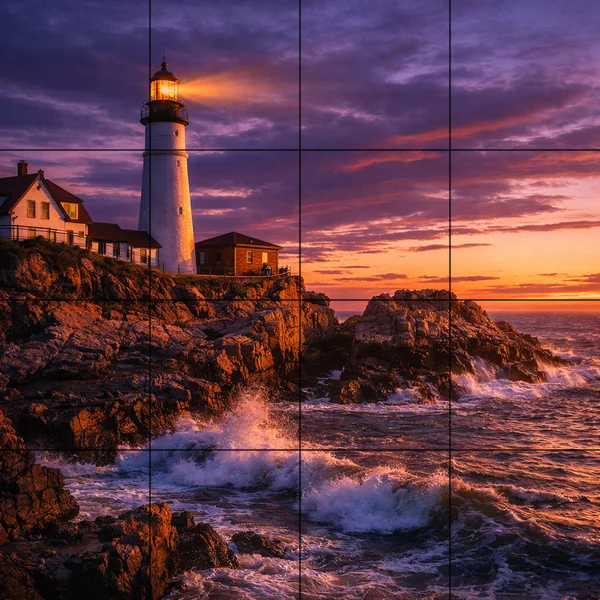
Add a grid to a photo for grid drawing
The grid method is the oldest proportion trick in art, and it still works. Divide the reference into squares, divide your paper into the same count of squares, and copy one square at a time. Your eye only ever judges proportions inside one small cell, which is why the results come out accurate without tracing.
Numbered template mode builds the reference half of that setup in one click. Column and row numbers run along the edges, so "the mountain peak starts in 5-3" means something.
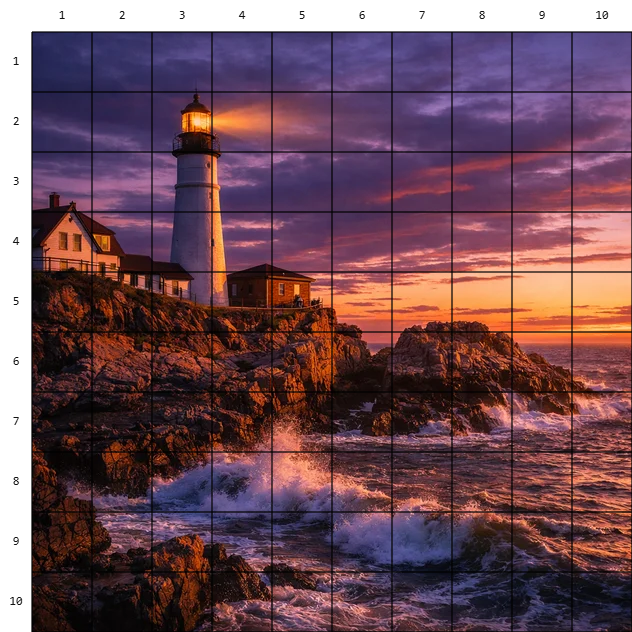
Art teachers hand these out as worksheets. Ten columns is the usual starting point, and more squares means easier drawing but more of it.
Numbered pixel art grid templates
A pixel art grid turns any small image into a buildable pattern. Upload a sprite, set the cell size, and the numbered template gives you a chart you can work from square by square, whether that's pixel art on graph paper, a bead or perler pattern, a crochet chart, or a build plan for a blocky sandbox game.
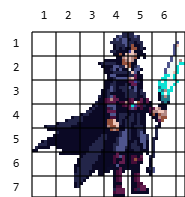
Small sprites upscale automatically in template mode so every cell stays readable. The mage sprite above renders its 8px cells at print size without blurring, because the upscale is nearest-neighbor, the same rule every pixel editor uses.
Cell size or columns
The two modes exist because the two audiences think differently. Cell size fixes each square in pixels. Set it to your sprite's tile size, 8, 16, or 32, and the grid lands exactly on the tile boundaries, which is how you check alignment on a sprite sheet or count pixels on a sprite. Columns divides the image width into a chosen number of squares, which is how the grid method works on photos, where nobody cares that a cell is 150 pixels wide.
Line styling covers the readability problem. A 1px black grid disappears on a dark photo and shouts on a light sprite, so the color picker, three line widths, and the opacity slider are there to make the grid visible without burying the image. Around 60% opacity reads on most photos.
From gridded reference to pixel art
A grid is usually the first step of making something. The workflow the site is built around continues from here. Convert the reference photo itself with the image to pixel art converter, pull its colors with the palette extractor, or skip the reference entirely and generate sprites from a text prompt with the AI sprite generator on Sprite AI (sprite-ai.art).
Tips for a useful grid
Most unreadable grids are a contrast problem, not a size problem.
- Match the grid color to the image's weakest area. White lines for dark photos, black for light ones, or a saturated color like red for busy images
- Drop opacity to 40-60% for drawing references. Full-strength lines compete with the image you're trying to read
- For sprite work, set the cell size to the sprite's native tile size so the lines fall on real boundaries
- Printing a template? More, smaller squares make the drawing easier but slower. Ten columns is the classic worksheet setup
More free pixel art tools
 Tool
ToolBackground remover
Remove solid-color backgrounds from sprites. Click to remove globally or flood-fill connected areas.
 Tool
ToolDithering tool
Apply Floyd-Steinberg or ordered Bayer dithering to images with adjustable color count.
 Tool
ToolOutline generator
Add pixel outlines to sprites with custom color and thickness. Canvas expands automatically.
FAQ
Upload the photo, choose how many columns you want or a fixed cell size, set the line color, width, and opacity, then download the gridded image as a PNG.
Yes. It's free with no account, and everything runs in your browser.
The grid method divides a reference photo into equal squares, and you copy one square at a time onto matching squares on your paper or canvas. It keeps proportions accurate without tracing, and a numbered grid makes each square easy to find.
Yes. Turn on Numbered template and the tool adds column and row numbers along the edges, upscaling small sprites so every cell stays readable. The download prints cleanly.
Cell size fixes the squares in pixels, which suits sprites and tile work. Columns divides the image into a chosen number of squares, which suits the grid drawing method on photos.
The lines draw on top of a copy. Your original file stays untouched, and the download is a new PNG at the same resolution, plus a margin when numbering is on.