
Text
Letters, numbers, and common punctuation. Line breaks make new lines.
Preview
Type something above to preview
Quick styles
Pixel font generator
Type any text and turn it into pixel font art you can download as a PNG or SVG. This pixel font maker has three font sources. Four built-in bitmap fonts drawn pixel by pixel, four bundled open-license pixel fonts, and an importer that converts any font file you upload into pixel form. Add an outline, a drop shadow, or a full RPG text box, and everything renders live in your browser with no account. Every image on this page was made with this tool.
The four built-in bitmap fonts
Built-in fonts are true bitmap fonts, every glyph hand-placed on its grid, so they render identically at any scale. The 5x7, 8x8, and Blocky sets include real lowercase. The tiny 3x5 auto-uppercases, because nobody can draw a readable lowercase g in fifteen pixels.



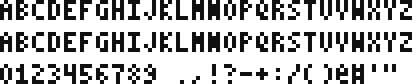
Which one to use is mostly a size decision. 3x5 squeezes into HUD corners, 5x7 is the workhorse, 8x8 shouts, and Blocky reads like a crafting game.
Turn any font into a pixel font
The pixel font converter takes a TTF, OTF, WOFF, or WOFF2 file and rasterizes it onto a coarse pixel grid, in your browser, nothing uploaded to a server. Here's Lora, an ordinary serif, at three grid sizes.



Five settings control the conversion. Grid size is the pixel height of each character and does most of the work, as the sweep above shows. Width squeezes or stretches letterforms. Weight fakes a bold by thickening strokes before they hit the grid. Edge threshold decides how much of a letter's anti-aliased edge counts as a pixel, so low values fatten the result and high values thin it. Roughen randomly erodes edge pixels for a hand-drawn look.
Thing is, most fonts were never designed for a 10px grid, and thin serifs will break apart at small sizes. That's not a bug. Nudge the threshold down or the grid up until the letterforms hold, or lean into the decay for grunge titles.
Bundled pixel fonts, ready to go
The Pixel fonts tab ships four open-license classics so you don't have to hunt for files. Press Start 2P (the arcade standard), Silkscreen, VT323 (the terminal look), and Pixelify Sans. Each loads at its native design grid automatically, because sampling a pixel font off its intended grid is what shredded letterforms look like.

All four are SIL Open Font License, so the output is safe for commercial games and videos.
Outlines, shadows, and text boxes
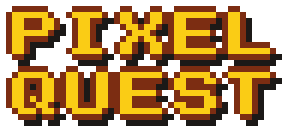
Styling is what separates pixel text from a game asset. The style tab adds a one-pixel outline in any color, an offset drop shadow, and three background modes including a framed RPG text box. The quick-style chips set a whole look in one click.
Game title
Damage number



Multi-line text works everywhere. Line breaks in the input become lines in the output, with left, center, or right alignment and adjustable letter and line spacing.
From pixel text to game asset
The download is a transparent PNG at the exact pixel size you see, which is what a game engine wants. Keep the small version and let the engine scale it, or crank the scale slider for web and video use. The SVG export rebuilds every pixel as a vector square, so it scales to poster size with hard edges.
For anything beyond text, the same site runs a full sprite pipeline. Convert a photo with the image to pixel art converter, pack frames with the sprite sheet maker, or generate characters from a text prompt with the AI sprite generator on Sprite AI (sprite-ai.art), at anything from 32x32 to 400x400.
Tips for cleaner pixel text
Most bad pixel text comes from fighting the grid instead of picking the right one.
- Match the font to the space. A health bar label wants 3x5 or 5x7, a title screen wants 8x8 at a high scale
- Outlines double as contrast insurance. White text with a dark outline stays readable on any background
- When importing a font, bold faces survive small grids far better than thin ones
- 8 bit font look in one move, 8x8 arcade plus a hard single-color shadow
- Keep letter spacing at 1px for body text. 0px reads as a solid wall at small sizes
More free pixel art tools
 Tool
ToolPixel art editor
Create and edit pixel art sprites in your browser. Custom canvas sizes, paint tools, export as PNG or SVG.
 Tool
ToolSprite sheet pivot editor
Preview a sprite sheet frame by frame and set the pivot point, frame rate, and loop. Export a ready-to-use manifest.
 Tool
ToolNoise generator
Generate pixel noise patterns and textures — Perlin, checkers, bricks, random.
FAQ
Type your text, pick a font, and download the result as a PNG or SVG. Fonts render at their native pixel grid, so the output drops straight into a game engine or image editor.
Yes. It's free with no account and no watermark. Type, style, and download as many PNGs as you want.
Yes. Upload a TTF, OTF, WOFF, or WOFF2 file and the converter rasterizes it onto a pixel grid you control, with width, weight, edge threshold, and roughen settings. The conversion runs in your browser.
A-Z, a-z, 0-9, and common punctuation including quotes. Line breaks in the text box create multi-line output. The tiny 3x5 font auto-uppercases lowercase input.
A bitmap font stores every character as a fixed grid of pixels instead of vector curves. The four built-in fonts here are true bitmap fonts, drawn pixel by pixel at 3x5, 5x7, 8x8, and 6x8 cell sizes.
Yes. The PNG works as UI text, title screens, damage numbers, or dialogue. The output is plain pixels with transparency, and the SVG export scales without blurring.
Use the 8x8 arcade font with an outline, or Press Start 2P from the bundled pixel fonts. Both are drawn on the same coarse grids 8-bit hardware used.