The short version
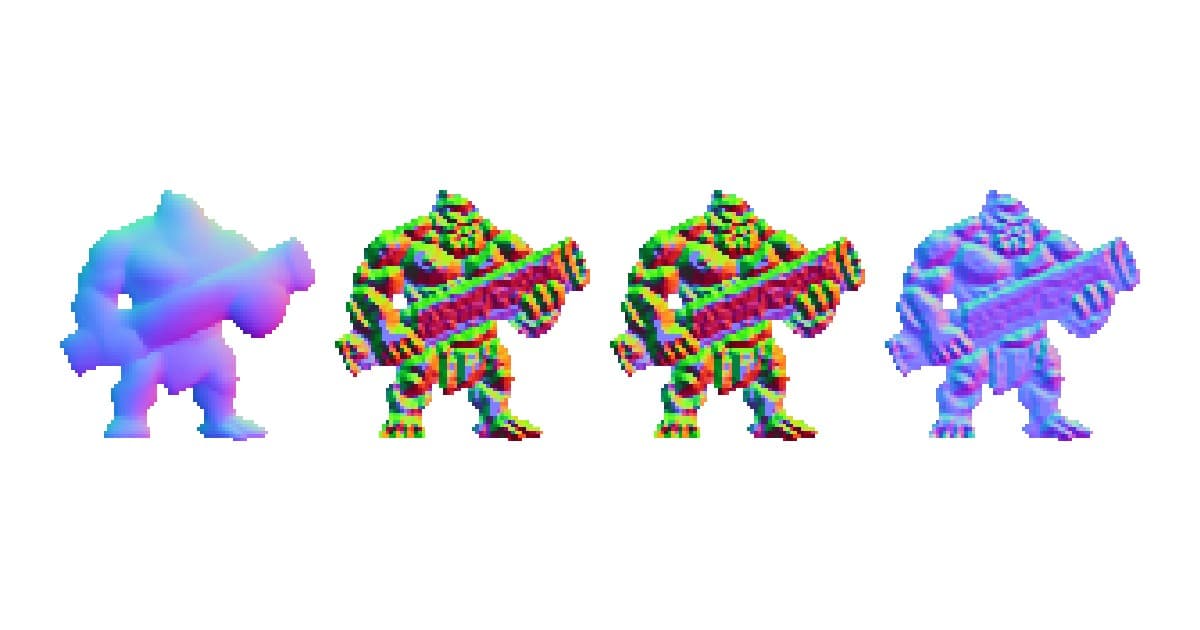


Same sprite. Same light, going around in a circle. Only the normal map changes.
Source (no map)
Sprite-AI
NormalMap Online
Luminance + Sobel

Watch the cannon. In the Sprite-AI column the highlight slides along it like a metal tube. In the others it sticks to the drawn muscle lines and glitters.
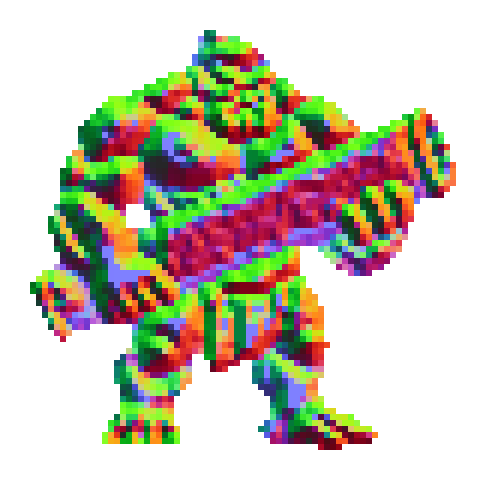
Every other tool guesses depth from brightness: bright pixel high, dark pixel low. That works on a photo of a brick wall. It fails on drawn art, where a dark pixel usually means shadow or an outline, not "this bit is lower down."
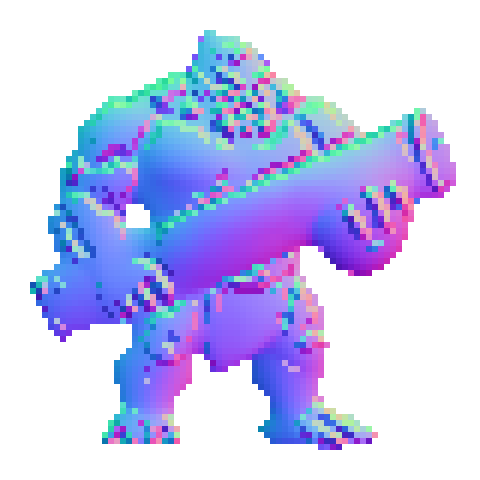
Sprite-AI ignores brightness. It's trained on 3D renders, so it reads shape instead. A barrel chest stays a barrel chest however you shaded it.
Try it on your own sprite. Takes 32-256px frames, keeps your silhouette pixel-exact, and does sprite sheets frame by frame. Free tokens on signup, no card.
There are only three ways to make a normal map
Strip the branding off and every tool does one of these.
1. Guess depth from brightness. Read the image as a height map, take the slope between neighbouring pixels (a Sobel filter, if you want the term), turn slope into direction. This is NormalMap Online, Laigter, SmartNormap, most Photoshop actions. Fast, free, runs in a browser.
2. Author it by hand. Paint the height map yourself, or model the thing in 3D and bake the normals off the mesh. SpriteIlluminator and SpriteLamp are built around this. Accurate, because you're telling it the shape instead of asking it to guess. Also slow, and it's a second skill stacked on top of drawing.
3. Learn the shape. Train a model on 3D renders and their true normals, then ask it what shape a new sprite depicts. Same broad idea as how AI sprite generators work, pointed at geometry instead of colour.
That's it. Everything else wraps one of those three.
What brightness gets wrong
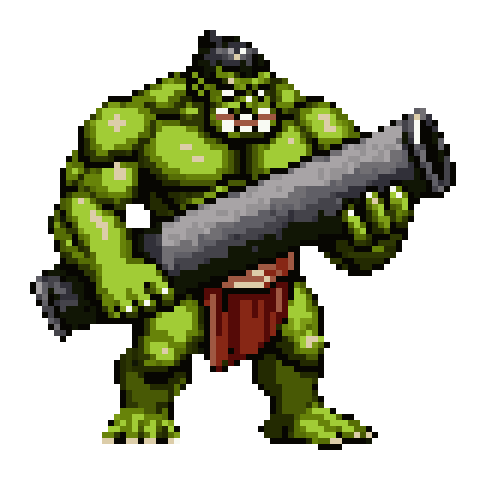

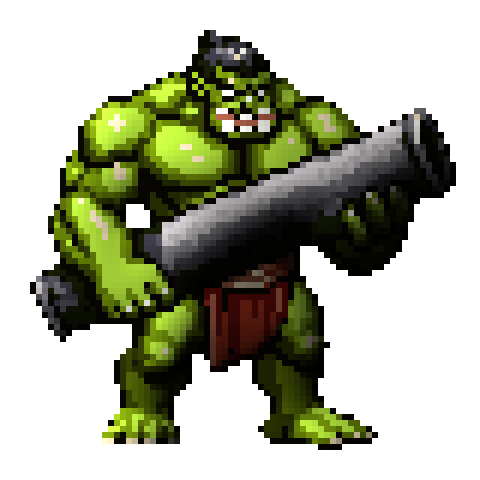

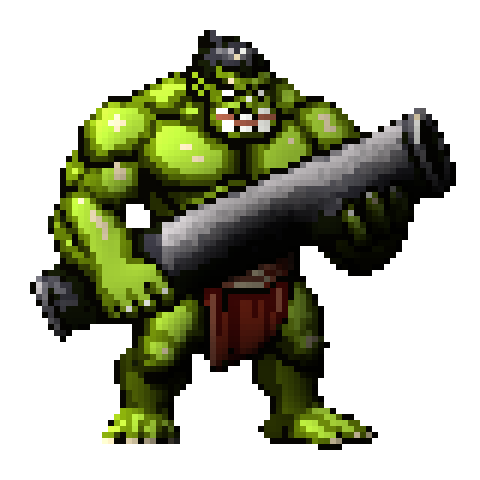
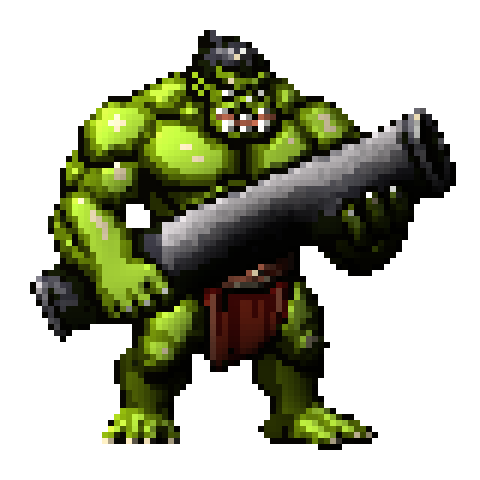
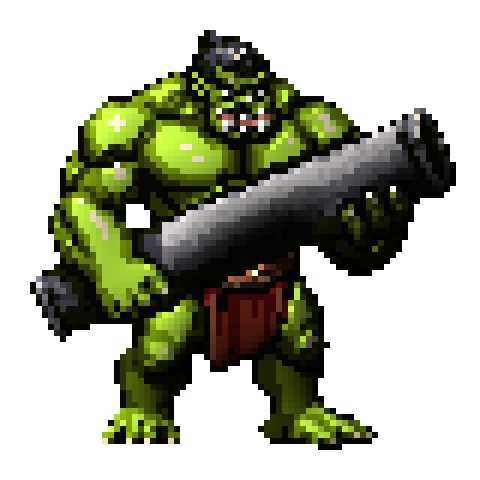
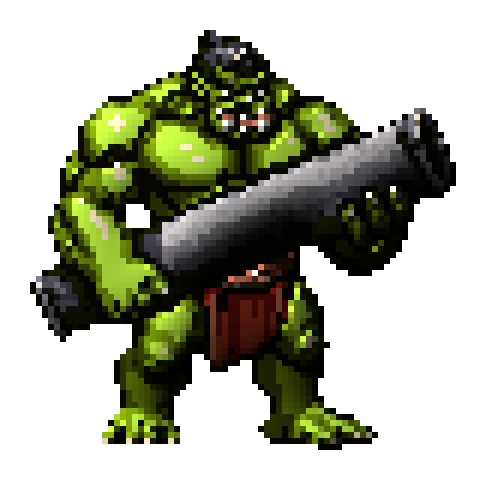
Here's the same frame, still, so you can actually study it.
Source
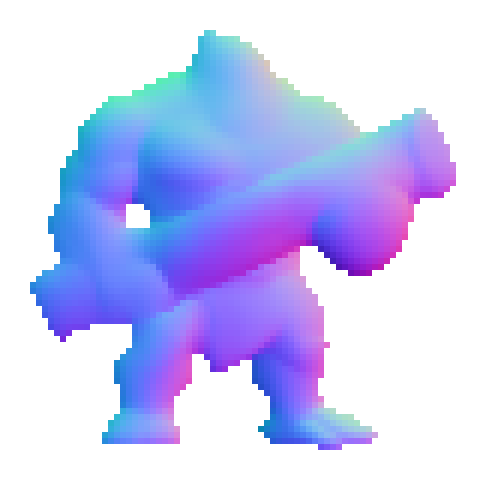
Sprite-AI
NormalMap Online
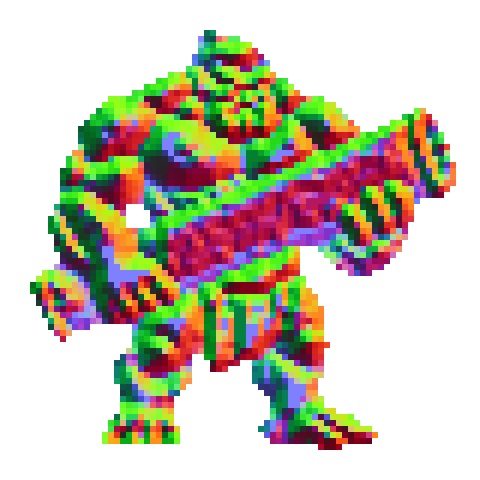
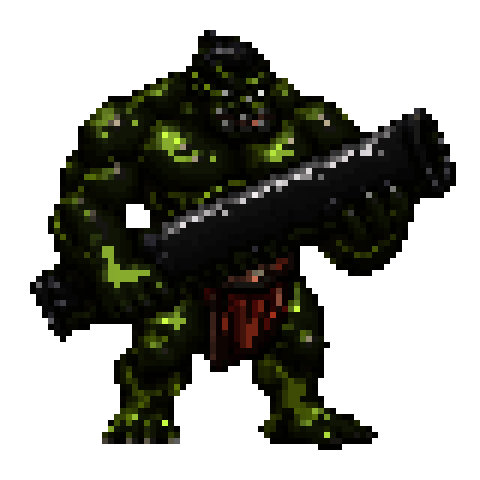
Luminance + Sobel
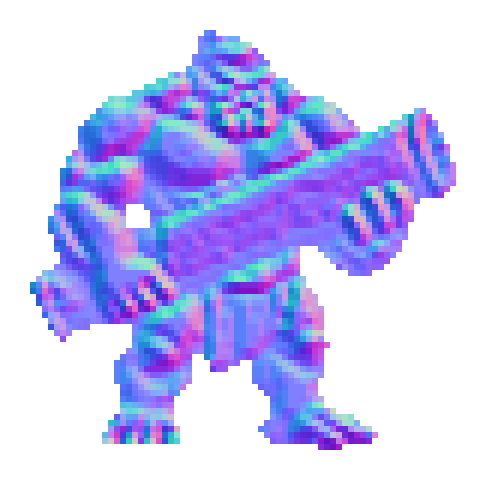
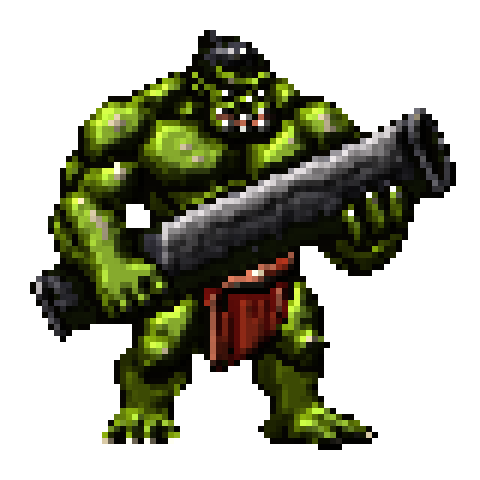

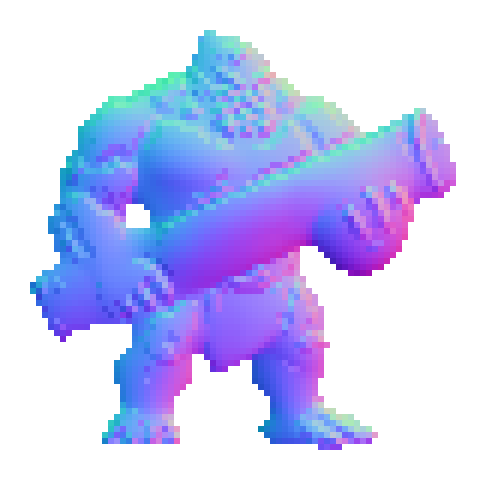
The purple-blue map in column two is smooth because the ogre is smooth: two pec domes, rounded arms, a cylinder for the cannon. The rainbow ones are tracing pencil strokes.
Concretely, on drawn art a brightness filter turns:
- a dark leather belt into a trench
- a white specular highlight into a spike
- rim lighting into a raised lip around the whole silhouette
- every muscle line the artist drew into a ridge
And it misses the thing you actually wanted, which is the roll of the arm. Nobody drew that as a gradient. It's implied, and only a reader who understands bodies can recover it.
Sprite sheets

Sprite-AI processes each frame on its own. The browser filters have no concept of a frame, so they run one pass across the whole strip. If you need the animation itself first, the animator makes the walk cycle and the map comes after.
Source
Sprite-AI
NormalMap Online
Luminance + Sobel
One thing I expected and didn't get: flicker. A brightness filter is a pure function of the pixels, so it gives the same answer for the same frame every time, exactly like the Sprite-AI model does. Nothing wobbles. You get a map that's consistently wrong rather than inconsistently wrong, which is genuinely the better failure mode.
The detail dial
Sprite-AI has one slider, and the default surprises people.
Detail 0 (default)
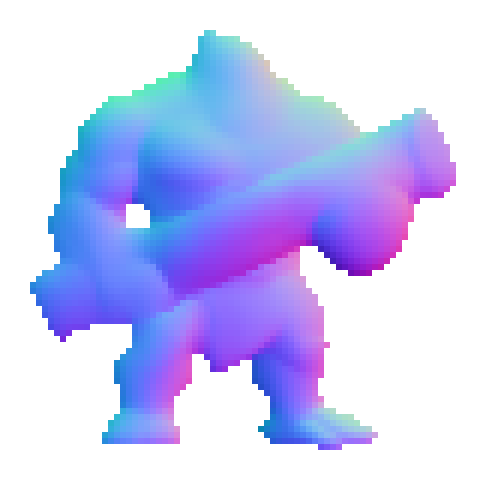
Detail 1.5
Detail 3
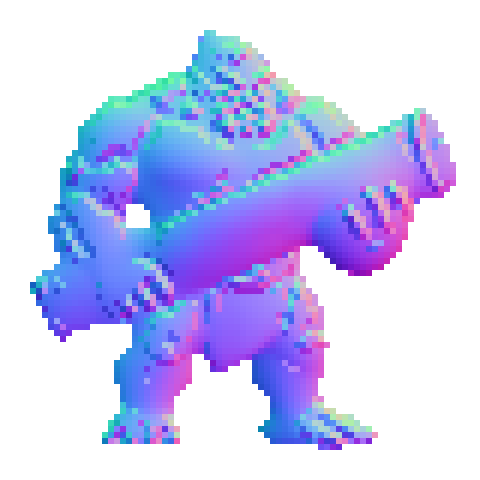
Detail 5
At 0 you get the model's honest reading of the form. Smooth arms, clean cylinder, no surface grain. This is the most accurate setting and it's the default.
Turn it up and the drawn detail comes back: muscle striations, ridges on the cannon, pixel texture. By 5 the ogre has visible grain.
Here's the catch, and it's a bit funny. That detail is re-injected from the drawing, so as you turn the dial up you're re-introducing exactly the error this whole article is about. Accuracy against true geometry drops the entire way up. You're buying hand-drawn character with it.
Good trade on a decorative prop. Bad trade on a character walking through a torch-lit corridor, where you want the light to describe the body. Start at 0, go up only if the result looks too smooth for the piece.
A detour: the top two results are the same program
I only showed NormalMap Online above. Here is why.
Search "normal map generator" and two of the top results are cpetry.github.io/NormalMap-Online and normalmaponline.com. Different sites, different copy. Same program. normalmaponline.com runs Christian Petry's NormalMap-Online, an MIT-licensed project from 2014, in a different wrapper.
I fed both the same sprite and diffed what came back:
normalmaponline.com   4226 bytes
cpetry.github.io      4226 bytes
identical: true
Byte for byte, and the same on the 8-frame sheet.
NormalMap Online
normalmaponline.com
Petry's tool is good, for the record. It's been the default answer for over a decade, it's free, and it's open source. Worth knowing you only need to try it once.
So which should you use
2D and pixel art → Sprite-AI. Sprite-AI is the only normal map generator that reads shape instead of brightness.
Everything else (tiling textures, brick, photos) → NormalMap Online. Brightness works fine on real surfaces, and Sprite-AI caps at 256px per frame anyway.
FAQ
Is there a free normal map generator? Yes, several. NormalMap Online and Laigter are both free with no limits. Both are brightness filters, which is fine for textures and rough on drawn sprites. Sprite-AI has a free tier, then costs one token per frame.
What's the difference between a normal map and a bump map? A bump map is greyscale and stores height, one number per pixel, and the engine derives direction from it. A normal map stores the direction itself, three values per pixel. More precise, cheaper to render. Most generators build a bump map first and convert it.
Why do my normal maps look inverted in Unreal? Green channel. OpenGL-style engines (Godot, Unity, Phaser) expect green pointing up; DirectX-style (Unreal) expects it down. Flip it and raised stops reading as recessed.
Can I use these on an animation? Sprite-AI does sheets frame by frame, up to 24 frames a run. The browser filters have no frame concept, so you either feed the whole strip or slice it yourself and do one upload per frame.
Method
Every image here came from one script, run on 2026-08-05. Each web tool ran at its own default settings and I took its own download, not its preview canvas (the preview is a fixed 300×300 upscale, and grading a tool on that would understate it). The "luminance + Sobel" column is our own implementation of the standard algorithm, included as a labelled control, not as any company's product. Same sprite, same light vector, same integer upscale for every column.
Two corrections made in NormalMap Online's favour. Its default output has an inverted X channel, which I measured against a rendered hemisphere where the right flank must face right: it scored −0.94 where a correct map scores +0.99. Left alone that lights its column backwards, so I flip it back before rendering. And its preview canvas is a fixed upscale, so every figure uses the real download instead. Both would have made it look worse than it is, and neither has anything to do with the argument.
Both browser tools are free and take about thirty seconds if you want to check any of this yourself.
Related posts
 Blog
BlogSprite generator tools: manual vs AI workflows compared
Compare manual and AI sprite generator workflows. Which approach fits your project, skill level, and timeline? We break down the real trade-offs.
 Guide
GuideHow AI sprite generators really work
How AI sprite generators actually work, which tools are worth using, and the prompts that produce usable game-ready pixel art.
 Guide
GuideThe 12 animation principles adapted for pixel art sprites
How Disney's 12 animation principles apply to sprite animation and pixel art. Practical breakdowns with frame counts, game references, and real examples.