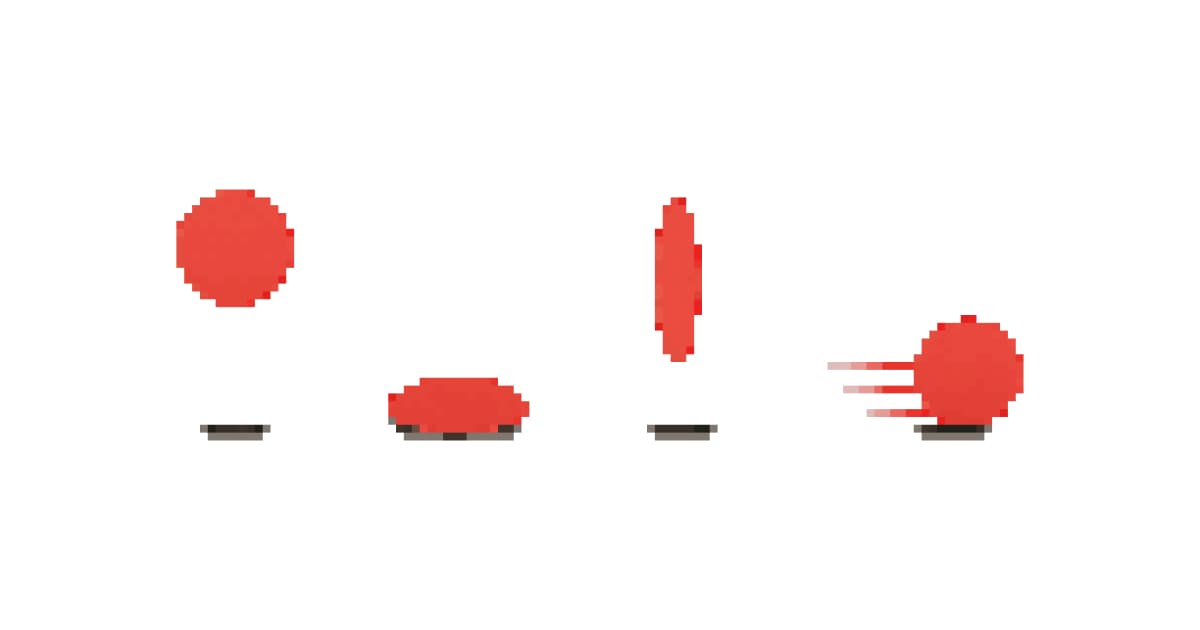
Why 90-year-old animation theory still matters for pixel art
In 1981, two Disney animators, Frank Thomas and Ollie Johnston, published The Illusion of Life and codified 12 principles that made hand-drawn animation feel alive. Those principles were designed for cel animation at 24 frames per second on full sheets of paper. You're working at 16x16 pixels, maybe 6 frames, maybe 10fps.
Doesn't matter. The principles still apply.
They apply because they're not really about drawing technique. They're about how the human eye reads motion. A bouncing ball looks wrong without squash and stretch whether it's painted on celluloid or placed on a pixel grid. Your brain doesn't care about the medium. It cares about whether movement feels real.
That said, not all 12 principles carry equal weight in sprite animation. Some are absolutely critical: timing, anticipation, squash and stretch. Others translate loosely or barely matter at tiny resolutions. I'll be honest about which is which. No point treating all 12 like sacred law when three of them do 80% of the work.
If you're brand new to animating sprites, the how to animate pixel art guide covers the practical workflow (walk cycles, idle loops, attack sequences). This guide is the why behind those techniques.
Timing: the one principle that matters most
I'm putting this first because if you only internalize one thing from this entire guide, it should be this. Timing is everything in pixel animation. Not your pixel placement, not your frame count, not your color choices. Timing.
Timing means how long each frame displays before the next one appears. That's it. And it changes everything.
Hold an impact frame for 150ms instead of 80ms and suddenly an attack feels powerful. Speed through a wind-up at 50ms per frame and the motion feels snappy. Play every frame at the same duration and your animation feels like a metronome. Mechanical, lifeless, wrong.
Frame duration reference
| Action | Frames | Duration per frame | Total time |
|---|---|---|---|
| Idle breathing | 2-4 | 300-500ms | ~1-2s loop |
| Walk cycle | 4-6 | 100-150ms | ~0.5-0.8s loop |
| Run cycle | 6-8 | 60-100ms | ~0.5-0.7s loop |
| Attack wind-up | 1-2 | 60-80ms | ~0.1s |
| Attack impact | 1-2 | 120-200ms (held longer) | ~0.2-0.3s |
| Attack recovery | 1-2 | 80-100ms | ~0.1-0.2s |
| Jump launch | 1-2 | 60-80ms | ~0.1s |
| Jump apex | 1 | 120-180ms (held) | ~0.15s |
| Landing squash | 1-2 | 80-120ms | ~0.1-0.2s |
See how the impact and apex frames are held longer? That's the secret. Uneven timing is what separates amateur sprite animation from professional work. Dead Cells does this brilliantly: attacks snap forward fast but the weapon hangs at full extension for just a beat. That pause sells the hit.
fps vs frame holds
Most game engines run at 60fps, but that doesn't mean your animation needs 60 frames per second. Your sprite animation runs on its own timeline. A 4-frame walk cycle at 120ms per frame is effectively ~8fps. That's fine. That's what Shovel Knight uses and it looks fantastic.
Don't think in fps. Think in milliseconds per frame, and vary them.
Squash and stretch
This is the big one. Literally the first principle Disney documented, and arguably the most visible in pixel art.
Squash and stretch means objects compress on impact and elongate during fast movement. A ball flattens when it hits the ground and stretches tall as it bounces up. A character squishes down before a jump and stretches vertically during launch.
At low resolution, you're working with 1-3 pixel shifts. That's all you've got. And it's enough.
How it works at 16x16
Your character is maybe 14 pixels tall in their neutral pose. For a jump anticipation frame, make them 12-13 pixels tall and 1 pixel wider. That's squash. For the launch frame, make them 15-16 pixels tall and maybe 1 pixel narrower. That's stretch. Two pixels of difference. At game speed, it reads perfectly.
Celeste is the masterclass here. Madeline squashes and stretches constantly during dashes, jumps, and wall grabs. The sprite deformation is aggressive (way more than you'd expect), and it works because it only lasts a frame or two. Your eye registers the energy without consciously seeing the distortion.
When to skip it
Static objects. Background tiles. UI elements. NPCs standing in a town. Squash and stretch is for things in active motion. Don't apply it to everything or your game looks like it's made of jelly.
Anticipation
Before any action, a brief counter-movement in the opposite direction. Pull back before punching. Crouch before jumping. Lean back before running forward. Wind up before swinging a sword.
This one's non-negotiable for sprite animation. Without anticipation, actions feel like they teleport into existence. With it, even a 3-frame attack sequence feels readable and intentional.
The practical version: add one frame before your main action where the character does the opposite. That's the whole technique. One extra frame transforms floaty movement into grounded, weighty motion. It also gives the player a visual telegraph, critical in action games where they need to read enemy attacks.
Hollow Knight nails anticipation. Every enemy wind-up is clear and distinct. You can read what's coming from across the screen, which is why the combat feels fair despite being punishing.
Staging
Staging is about clarity. Can the player instantly read what the character is doing from the silhouette alone?
At 32x32 this is achievable. At 16x16 it's hard. At 8x8 it's nearly impossible. The smaller your sprite, the more you need to exaggerate poses, use contrast, and keep silhouettes distinct between frames.
A test: squint at your animation until it's blurry. Can you still tell what action is happening? If not, push the poses further. Make the sword arm extend farther. Make the crouch lower. Make the jump higher. Readability beats realism at small sprite sizes. Always.
Straight ahead vs pose-to-pose
Two approaches to creating animation frames. Straight ahead means you draw frame 1, then frame 2, then frame 3 in sequence, each one a slight modification of the last. Pose-to-pose means you draw the key poses first (the extremes of the movement), then fill in the gaps afterward.
For pixel art? Use both. Seriously.
Pose-to-pose works best for: Walk cycles, run cycles, attack sequences. Anything with clear key positions. Draw the contact poses first, then create the in-betweens. This keeps your animation structured and prevents drift, that thing where your character slowly migrates across the canvas because each frame shifted a pixel to the right.
Straight ahead works best for: Particle effects, fire, water, organic movement, anything chaotic. Drawing flame frame-by-frame produces more natural-looking randomness than trying to plan key poses for fire.
Most professionals use pose-to-pose for characters and straight ahead for effects. Copy that workflow and you'll save yourself a lot of frustration.
Follow through and overlapping action
When a character stops moving, not everything stops at once. Hair keeps swinging. A cape continues forward. A tail whips behind. Armor settles. This is follow through: secondary elements continuing past the main action's end point.
Overlapping action is the related idea that different body parts move at different rates. Arms swing differently than legs. A head bob follows a different rhythm than the torso bounce.
The practical pixel version
At 32x32, you have room for follow through on hair, capes, scarves, tails, long ears. Add 1-2 extra frames after the main movement where these elements catch up. At 16x16, you're limited. Maybe one pixel of hair movement after the body stops. At 8x8, forget it. You don't have the pixels.
This is one of those principles that scales with resolution. More pixels, more follow through. Don't force it at sizes where you can't spare the visual space.
Slow in and slow out
Objects don't move at constant speed. They accelerate from rest and decelerate to a stop. In traditional animation, you achieve this by spacing frames closer together at the start and end of a movement, with wider spacing in the middle.
In pixel animation, you can't really vary spatial distances that precisely. A pixel is a pixel. Instead, you control easing through frame timing.
Slow in: Hold the first frames of a movement longer (more ms per frame). The character lingers at the start.
Slow out: Hold the last frames longer. The character settles into the end position.
Fast middle: The frames in the middle of the action play quickly.
This is just the timing principle applied specifically to starts and stops. But it's worth calling out separately because beginners almost always use uniform frame timing and wonder why their animations feel robotic.
Arcs
Natural movement follows curved paths, not straight lines. A hand swinging a sword follows an arc. A jumping character follows a parabolic arc. Even a head turning follows a slight curve rather than sliding horizontally.
At the sprite level, arcs mostly matter for weapon swings, projectiles, and jump trajectories. If your character's sword goes from position A to position B in two frames, make sure the path between them curves. A sword that teleports in a straight line looks like a piston, not a swing.
Honestly, this principle takes care of itself if you study reference animations from games like Metal Slug. Those animators understood arcs intuitively. Every movement curves, nothing moves in a straight line, and the result is sprites that feel impossibly fluid for their resolution.
Secondary action
Dust particles when a character lands. Hit sparks on impact. Screen shake during explosions. Speed lines behind a dash. A shadow stretching during a jump.
None of these are the primary animation. They're additions that support it. And they do more for game feel than almost anything else.
Here's the thing about secondary action in pixel art: it's often not even part of the sprite animation itself. Dust clouds are separate particle sprites. Screen shake is engine-level. Hit sparks are spawned on collision. You animate the character, and the secondary actions are layered on top by the game engine.
But you still need to design them. A 3-frame dust poof (small cloud, bigger cloud, fading cloud) at the character's feet makes landing feel impactful. A 2-frame hit spark (bright flash, dissipating pixels) makes attacks feel crunchy. These take minutes to create and transform game feel completely.
Dead Cells goes absolutely wild with secondary action. Every attack spawns particles, every dodge leaves trails, every enemy death explodes into effects. Strip those away and the combat would feel half as good, even with identical character animations.
Exaggeration
Push everything further than reality. Jumps higher than physically possible. Squash deeper than any body would compress. Wind-ups pulled back further than anatomy allows. Impact poses more extreme than physics permits.
Metal Slug is the king of exaggeration in pixel animation. Characters lean at impossible angles, weapons have absurd recoil, vehicles bounce like rubber. It reads as energetic and fun rather than realistic and boring. The artists knew that at small sprite sizes, subtle movements disappear. You have to overshoot to make things read.
The rule of thumb: whatever feels "about right" in your animation, push it 30% further. It'll look weird zoomed in on a single frame. At game speed, it'll look perfect.
One sentence version: if your pixel animation looks realistic, it's too subtle.
Solid drawing (solid pixel placement)
The original principle is about maintaining consistent volume, weight, and three-dimensionality across frames. For pixel art, this translates to: your character shouldn't change size or shape unintentionally between frames.
Count pixels. If the torso is 6 pixels wide in frame 1, it should be 6 pixels wide in frame 3 (unless squash/stretch is intentionally applied). If the head is 5x5 pixels, it stays 5x5. Characters that subtly grow and shrink between frames look unstable and wrong, even if the viewer can't articulate why.
Use onion skinning. Always. It makes volume inconsistencies immediately obvious. The pixel art fundamentals guide covers this in more depth for static sprites, and everything there applies double when you're animating.
Appeal
The last principle, and the fuzziest. Appeal means your character is interesting to look at. Not necessarily cute or beautiful. Hollow Knight's bugs are appealing. Dark Souls' monsters are appealing. Appeal means the design has clarity, personality, and something that makes the player want to keep looking.
For animated sprites specifically, appeal comes from consistent personality across all animation states. Does the character move in a way that matches their design? A heavy knight should lumber. A nimble thief should snap. A slime should bounce and jiggle. When the animation reinforces the character concept, that's appeal in action.
Practical examples: putting it together
Walk cycle with principles applied
A basic 4-frame walk isn't just four poses. With principles layered in:
- Timing: Contact frames held 120ms, passing frames at 100ms (slow out on each step)
- Squash/stretch: Body drops 1px on contact, rises 1px on passing
- Arcs: Arms swing in slight curves, not straight pendulums
- Follow through: Hair or cape trails one frame behind body movement
- Secondary action: Optional dust puff on contact frames
Attack animation with principles applied
A 5-frame sword swing:
- Anticipation (80ms): character leans back, sword pulled behind
- Launch (50ms): fast transition, possible smear frame
- Impact (180ms): held long, full extension, screen shake trigger point
- Follow through (100ms): sword continues past target, body carries forward
- Recovery (120ms): settle back to ready stance
Idle loop with principles applied
A 4-frame idle:
- Neutral (400ms): base pose, long hold
- Squash (300ms): body shifts down 1px (exhale)
- Neutral (400ms): back to base
- Stretch (300ms): body shifts up 1px (inhale), hair/accessories lag by one frame
Using AI to generate animation keyframes
Here's where the modern workflow gets interesting. Traditionally, you'd sketch every key pose by hand. With tools like Sprite AI, you can generate base poses for your character in different positions (idle, attacking, jumping, running) and use those as starting points for your keyframes.
You won't get frame-perfect consistency out of any AI generator. The pixel placement between generated poses will vary. But that's fine. You use AI for the hard part (inventing distinct poses from different angles) and handle the easy part yourself (cleaning up pixel consistency between frames and adding in-betweens).
The sprite sheet generator at sprite-ai.art can help you organize finished frames into a game-ready sheet once your animation is complete. And if you're working frame-by-frame, the pixel editor handles individual frame touchups.
Common mistakes
Over-animating
More frames does not mean better animation. A 16-frame walk cycle where every frame is almost identical to the last just looks slow and mushy. Cut frames aggressively. If removing a frame doesn't visibly change the animation at game speed, it was dead weight.
Uniform frame timing
Already covered this in the timing section, but it's the most common mistake so it's worth repeating. Vary. Your. Frame. Durations. Constant timing is the fastest way to make otherwise good sprite animation feel mechanical.
Inconsistent easing
You ease into a jump beautifully (slow start, fast launch), but then the landing snaps to idle in one frame with no slow out. Every action that has a slow-in needs a slow-out. Every fast start needs a recovery settle. Asymmetric easing breaks the physics your animation is trying to sell.
Ignoring secondary action
Your character's swing animation is solid, but there's no hit spark, no dust, no screen shake. The swing happens in a vacuum. Layer effects on top. They're small sprites (4x4 pixel dust puffs, 3-frame spark flashes) and they take minutes to make. The payoff in game feel is massive.
Animating before the design is finished
Don't animate a character you're still designing. You'll change the head shape on frame 4 and have to propagate that change across 20 frames. Finish the base sprite first. Lock the design. Then animate. The how to animate pixel art guide covers the full workflow from static sprite to finished animation.
Where to go from here
You've got the theory. Now apply it. Pick one principle you haven't been using (anticipation, probably, since it's the most impactful and most commonly skipped) and add it to your next animation. Then another. Layer them in over time.
For practical frame-by-frame tutorials, the pixel animation guide walks through every common animation type. For understanding sprite animation frames in the context of sprite sheets and game engines, the animation frames blog post covers the export and implementation side.
The 12 principles aren't rules to memorize. They're a vocabulary for understanding why some animations feel right and others don't. When something looks off in your sprite animation, run through the list. Missing anticipation? Uniform timing? No follow through? The diagnosis is usually one of these twelve things.
Now go break a few of them on purpose. That's where style comes from.
FAQs
Which Disney animation principles apply to pixel art?
The most important ones: timing (the single biggest factor in good animation), anticipation (telegraph every action), squash and stretch (cheat with even 1 pixel of compression), and follow-through (1-2 extra frames after the main action). The remaining principles translate loosely or barely matter at small resolutions.
What's the most important animation principle for sprite animation?
Timing. Vary frame duration: slow on anticipation, fast on action, slow on recovery. Even timing on every frame is the #1 mistake beginners make, and fixing it improves animations more than adding extra frames ever will.
How do I make pixel art animation feel weighty?
Three things: hold impact frames longer (150-200ms vs 80ms for others), add anticipation frames before every action, and use squash-and-stretch (even 1 pixel of compression on a jump crouch reads as weight). For one-click pixel animation that handles these by default, the animator applies them for you.
Do animation principles apply at 16×16 resolution?
Yes, even more so. At tiny resolutions you can't rely on detailed drawings to sell the motion. Timing, anticipation, and squash-and-stretch are the entire toolkit. Celeste's Madeline is barely 16 pixels tall and her jumps feel great because the principles are layered in.
How long should each animation frame play for?
Idle: 400-500ms (slow, breathy). Walk: 80-150ms. Run: 50-80ms. Attack: variable (80ms setup, 150-200ms hold on impact, 80ms recovery). The variation matters more than the specific numbers.
Related posts
 Guide
GuideHow to animate pixel art: walk cycles, idles, attacks
Pixel art animation step-by-step. Walk cycles, idle loops, attack sequences: what to draw, how many frames, what to skip.
 Blog
BlogSprite animation frames: how many do you actually need?
Frame counts for walk cycles, attacks, idles. Real numbers from Hollow Knight, Celeste, Stardew. No theory.
 Blog
BlogPixel art animation: from first frame to game engine
How real indie games animate pixel art: frame counts, tools, FPS, and the full export workflow for Unity, Godot, and Phaser. Free tools included.