
The gap nobody warns you about
Most first pixel art games die in week two, and not because the work is hard.
They die because people start wrong. They plan a game ten times bigger than they can finish. They spend a month drawing tiles before writing a line of code.
Six steps. That's the entire pixel art roadmap, and the order matters more than any single step.
Step 1: Make a demo that's almost embarrassingly small
Your first game should fit on one screen.
Not an RPG. Not a Metroidvania. No crafting, no skill trees, no 47 enemy types. Celeste began as a four-day PICO-8 jam game, one room. Hollow Knight's first demo was three rooms and one boss.
Pick one mechanic and make it feel good. A jump. A dash. A sword swing. Build a few rooms around it and call that your game.
Good first projects
- A single-screen platformer
- A wave-based survival game, one arena
- A puzzle game, one mechanic, 10 levels
Projects that kill beginners
- An open-world RPG
- A farming sim
- Anything needing more than 50 unique sprites
You can always make it bigger later. You can't un-burn out.
Step 2: Choose an engine and stop second-guessing
Godot is the right answer for most first pixel art games, and the debate costs more than the choice.
| Engine | Price | Best for | Language | 2D quality |
|---|---|---|---|---|
 Godot Godot | Free (MIT) | Most 2D pixel art games | GDScript / C# | Excellent (native 2D) |
 Unity Unity | Free / $185+/mo | Bigger games or 3D hybrid | C# | Good (needs config) |
 GameMaker GameMaker | $0-100 | Beginners and game jams | GML | Excellent (built for it) |
 Phaser Phaser | Free | Browser/web games | JavaScript | Good (canvas-based) |
| Construct | $0-500/yr | No-code developers | Visual scripting | Good (no config needed) |
Godot is free, it's a 100MB download against Unity's 2+ GB, and its 2D is native rather than bolted onto a 3D engine. Set texture filtering to "Nearest" once and pixel-perfect rendering just works.
Take Unity if you already write C#. Take GameMaker if you want to be running around a room within 30 minutes, which is how Undertale and Hyper Light Drifter got made. Our best game engines for pixel art comparison goes deeper on all five.
The engine you know beats the engine that's technically better. Pick one today.
Step 3: Lock your art style before you draw
Three decisions now save you from a game that looks like five people made it.
Sprite size
Start at 32x32, and put your heroes at 64x64.
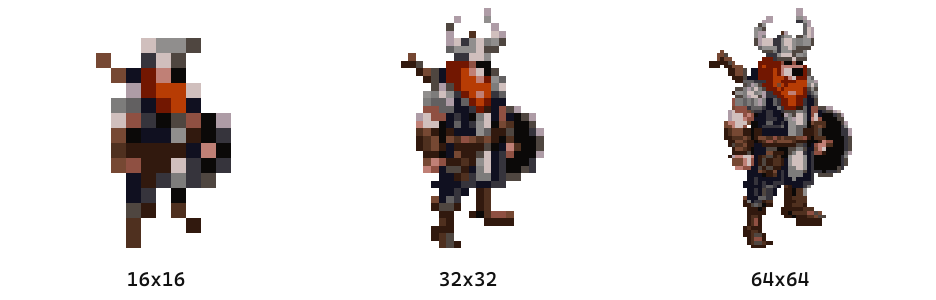
Same viking, three sizes, all made with the image to pixel art converter at 16 colors. At 16x16 the horns are gone and so is the axe. At 32x32 the silhouette comes back and you can tell what he's holding. At 64x64 you get the beard, the shield boss, and the fur on his shoulder.
| Size | Good for | Hand-drawn time |
|---|---|---|
| 16x16 | A deliberate NES-era look | 5-15 min |
| 32x32 | Most modern indie games | 15-45 min |
| 64x64 | Heroes, bosses, close-ups | 30-90 min |
Every extra pixel used to be another one you placed by hand, which is why smaller was always the safe answer. The AI sprite generator runs 32x32 up to 512x512, so a 64x64 hero takes the same few seconds as a 32x32 enemy. That time column is what it costs to draw them yourself.
Going after the NES-era look on purpose? The 16x16 pixel art guide covers working at that scale.
Color palette
Lock one palette and every sprite in your game instantly looks related.
Here's the same motorcycle three times over. The drawing never changed. The only difference is which colors it was allowed to use.
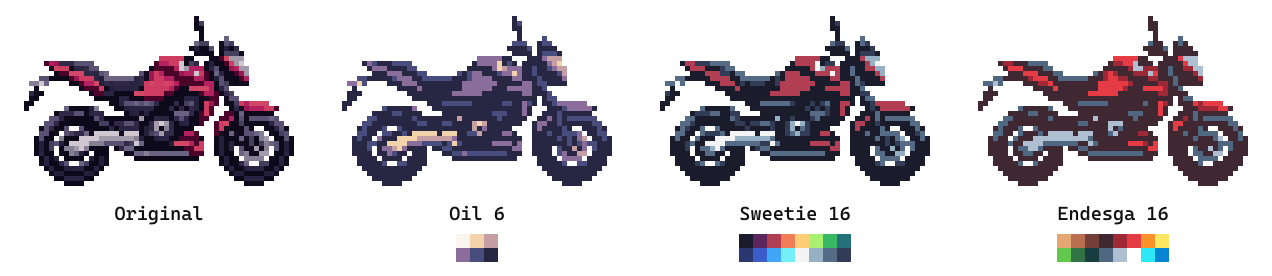
Oil 6 turns it into a dusk scene. Sweetie 16 makes it cold and neon. Endesga 16 keeps the red but warms everything around it. Pick the one that matches the game in your head and use it for every asset, UI included.
Sixteen colors is the anchor, scaled to your canvas. The constraint is the point. Want your own instead of a published set? The palette generator builds one from a base color and a harmony in about a minute, and the pixel art color palettes guide covers choosing between them.
Style rules
Write down three rules and follow them everywhere.
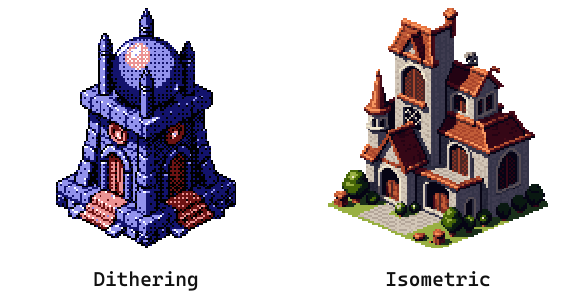
Outline treatment first. A dark outline reads at any size and is the safe default, and the outline generator puts a clean one-pixel border on a sprite that doesn't have one yet.
Then dithering, which means mixing two colors pixel by pixel to fake a third. It's how you get a gradient without adding colors to a locked palette, and that tower dome is ordered 4x4 from the dithering tool at 8 colors. Anti-aliasing is the opposite instinct, softening a hard diagonal with in-between pixels, and at 32 pixels it usually costs more than it buys.
Viewing angle last, and this one is a commitment. Isometric puts every tile on a 2:1 diamond, so once one asset is isometric they all have to be. Decide at the start or not at all, and the isometric pixel art guide covers the grid.
The test for all three is the same. The sprite you make at hour 50 has to match the one from hour 1.
Step 4: Make your sprites
Making pixel art for video games comes down to three routes, and the one that ships uses all of them.
Draw them yourself


Hand-drawing every sprite buys total control and costs you weeks.
The pixel editor runs in the browser, free, no account. Canvas from 1x1 to 512x512, frames along a timeline, onion skin so the previous frame sits ghosted under the one you're drawing, and playback at any speed. That's what makes it a sprite editor and not a drawing canvas.
One honest limit. It gives you frames, not layers. At 32 or 64 pixels you're placing individual pixels rather than compositing passes, so it rarely bites.
Already living in Aseprite? The Aseprite plugin puts generation inside it, so a sprite can land on your canvas without you switching windows. Never drawn one at all? The pixel art fundamentals guide walks a single sprite from silhouette to shading.
Generate them

If you aren't already a pixel artist, learning to draw before you start coding is backwards.
The AI sprite generator from Sprite AI (sprite-ai.art) takes a line like "pixel art knight, sword raised, 32x32, side view" and returns a usable sprite in seconds. Not perfect. Usable. That's the bar that gets your game playable while your drawing improves on the side.
You don't have to leave your code to do it. The MCP server wires the generator into Claude and Cursor, so you can ask for the sprite in the same conversation where you're writing the movement code and it lands in your project. When you need forty enemy variants or a whole tileset in one pass, the REST API does it in a loop while you work on something else.
The hybrid workflow that actually ships
Nobody finishing a game in 2026 is picking one route. They're stacking them.
- Generate the bulk with the AI sprite generator. Enemies, items, background objects.
- Animate in one pass with the animator. Walk, run, idle, attack, no frames drawn by hand.
- Refine in the pixel editor so everything matches your style rules.
- Draw the hero art yourself. Title screen, main character, bosses. The things players stare at.
That's not laziness, it's how studios have always worked. Concept, model, texture, rig. You're one person, so the pipeline collapses into one tool. When the sprites are done, upscale them for store screenshots.
Describe it, get a game-ready sprite in seconds.
Step 5: Build with placeholders first
Get something playable with colored rectangles inside week one.
A red square for the player, blue squares for enemies, green for pickups. Wire up movement, collision, one mechanic. You'll find the design problems immediately, and finding them with rectangles costs you nothing.
- Week 1. Rectangles, core mechanic playable
- Week 2-3. Real sprites in, iterate on feel
- Week 4+. Polish, juice, playtest
Prototype first. Pretty second.
Step 6: Polish is what makes it feel real
Polish is the difference between "student project" and something people want to play, and most of it takes minutes.
Screen shake. Two or three pixels on impact. Five minutes to build, makes combat feel completely different.
Particles. Dust on landing, sparks on metal, puffs when enemies die. Tiny 4x4 and 8x8 sprites over a few frames, and generating 20 variations takes about as long as drawing one.
Sound. Not art, but it carries as much weight. BFXR makes retro effects free. Give it an afternoon.
Juice. Squash and stretch, hitpause on connect, a white flash on damage, smooth camera follow. None of it is hard. All of it reads as polish.
The mistakes that kill pixel art game projects
Three failure modes account for nearly every abandoned pixel art game.
Adding one more thing. "What if I also..." is the most expensive sentence in pixel art game development. Features multiply your build time, they don't add to it. A platformer with a shop, crafting, and dialogue takes eight times as long as the plain platformer.
Art perfectionism. You've redrawn the player five times and haven't opened the engine in two weeks. Stop. Stardew Valley's art isn't technically impressive, it's charming. Undertale's is deliberately rough. Players care about feel.
Never shipping. The hardest part isn't code or art, it's saying done. Set a hard date, post it on itch.io, tell someone. A finished game with rough edges teaches you more than a perfect unfinished one.
Resources to keep moving
Five bookmarks cover almost everything you'll need after step one.
Art fundamentals. The pixel art fundamentals guide for readability, color, and form at small scale.
Sprites. The AI sprite generator for speed, the animator for cycles, the pixel editor for touch-ups.
Engines. Our best game engines for pixel art comparison.
Game feel. "Juice it or lose it", "The Art of Screenshake" by Jan Willem Nijman, and Celeste's GDC postmortem.
Communities. Our Discord for sprite and pipeline questions, plus r/gamedev, r/pixelart, the Godot Discord, and itch.io jams. Turn up with a playable prototype and you'll get feedback no article can give you.
Just start
The fastest way to learn how to make a pixel game is to make a bad one.
Open Godot, add a rectangle, make it move with the arrow keys. Everything else is iteration on top of that rectangle. Generate sprites at sprite-ai.art when you need art, fix them in the pixel editor, playtest constantly, ship on your date.
Celeste started as a rectangle that could jump and dash. So can yours.
FAQs
How long does it take to make a pixel art game?
A first game takes 3-6 months of evenings and weekends for a single-screen platformer or jam game. Large projects like Stardew Valley and Hollow Knight took 2-5 years. How much you try to build is the variable that decides it.
What's the best engine for a pixel art game?
Godot for most people. It's free, lightweight, 2D-first, and pixel-perfect rendering works out of the box. GameMaker gets you to a playable prototype fastest, and Unity wins if you already know C#. Full breakdown in our best game engines for pixel art comparison.
Do I need to know how to draw to make a pixel art game?
No. The AI sprite generator makes game-ready pixel art from a text description, and the animator handles walk and attack cycles. Most non-artist developers generate the bulk of their sprites and hand-draw only the key art.
Can I make a pixel art game with AI?
Yes. Generate sprites, animate them, export as sprite sheets or GIFs, then drop them into Godot, Unity, or GameMaker. The hybrid approach of AI for bulk assets and hand work for hero characters is what most shipped indie games actually use.
Where do I get pixel art for video games?
Three places, and most shipped games use all three. Generate it, which is fastest for the bulk of an asset list. Draw it yourself, which is what hero characters deserve. Or buy a pack, which is fine for tiles and props nobody looks at twice. Check the license on anything you did not make before it goes in a build you intend to sell.
How many sprites does a pixel art game need?
Far fewer than you think. Celeste's PICO-8 prototype had under 20. A single-screen platformer needs one player character with idle, walk, and jump cycles, one or two enemies, 5-10 tiles, and a few pickups. Call it 30-50 unique sprites.
Related posts
 Blog
BlogIs pixel art hard? Here's the honest answer
The truth about learning pixel art difficulty. What's genuinely hard, what's easier than you think, and how to shortcut the frustrating parts.
 Guide
GuideHow AI sprite generators really work
How AI sprite generators actually work, which tools are worth using, and the prompts that produce usable game-ready pixel art.
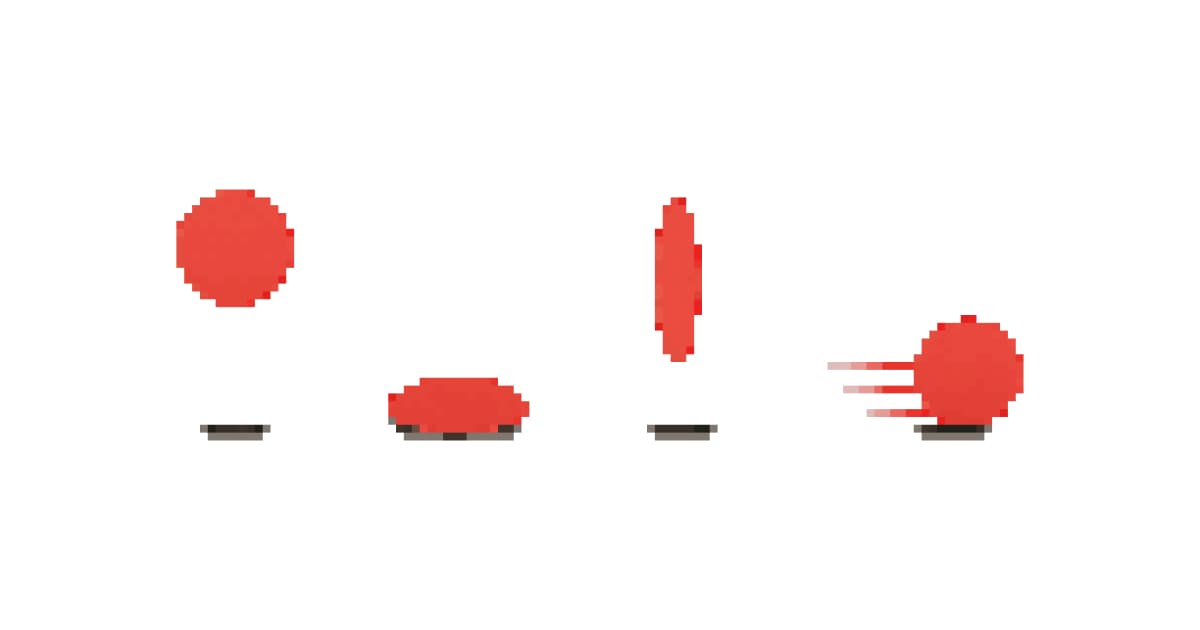 Guide
GuideThe 12 animation principles adapted for pixel art sprites
How Disney's 12 animation principles apply to sprite animation and pixel art. Practical breakdowns with frame counts, game references, and real examples.